AZ-400: Design & Implement Dependency Management
Dependency management
What it is
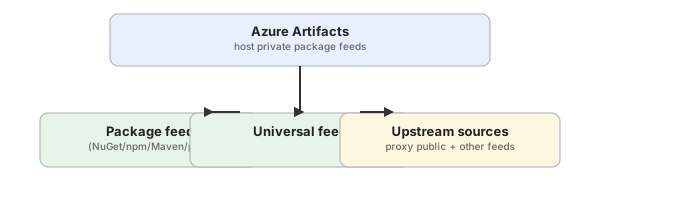
Dependency management is the practice of centralizing, versioning, securing, and controlling the packages and libraries your applications consume — both the third-party packages you pull in and the internal packages your own teams produce. In Azure DevOps the centerpiece is Azure Artifacts, which hosts feeds of NuGet, npm, Maven, Python, Cargo, Go, and Universal packages.
Why it exists
Applications are composed largely of packages they don’t write. If those packages are pulled ad-hoc from public sources, teams can’t control versions, provenance, licensing, or security, and the build is non-reproducible. Centralized dependency management makes builds reproducible and auditable, enforces a single source of truth, and hardens the supply chain against known vulnerabilities and tampering.
Key ideas
- Feed as single source of truth — a feed is a scoped, permission-controlled repository of packages that the whole org or team consumes.
- Version control for packages — SemVer + immutable package versions mean a build always resolves the same bits.
- Upstream sources — feeds can cache public packages (nuget.org, npmjs) through upstreams so builds don’t depend directly on the internet.
- Governance — permissions (who can read/publish), retention policies, deprecation, and promotion/views control package lifecycles.
- Supply chain security — a dependency management strategy is part of a dependency graph and feeds vulnerability scanning (dependency vulnerabilities).
How it fits
Exam notes
- Azure Artifacts is the AZ-400 answer to “centralized package management” — know it as the alternative to hand-rolling package storage.
- Feeds are project-scoped or org-scoped; org feeds are shareable across projects.
- Package versions are immutable once published — you cannot delete and republish a version, only retire/deprecate it.
- Upstream caching makes builds reproducible even when the public source is down.
Related
azure-artifacts · package-feed · upstream-sources · dependency-graph · pipeline-integration · semantic-versioning · dependency-vulnerabilities · build-artifact
📘 Source: Microsoft Learn — Dependency Management
Azure Artifacts
What it is
Azure Artifacts is the package management service in Azure DevOps. It lets teams create, host, and share packages from public or private feeds — supporting NuGet, npm, Maven, Python (PyPI), Cargo, Go, and Universal packages. It’s the AZ-400 tool for implementing a centralized dependency-management strategy.
Why it exists
Without a private package host, internal libraries have to be copied around or fetched from public registries, leading to version drift, broken builds, and supply-chain risk. Azure Artifacts gives a governed, permission-controlled place to store packages and cache upstream dependencies, so builds are reproducible and consumption is auditable.
Key ideas
- Feeds — the core container. A feed is project- or organization-scoped and holds packages plus their versions, views, and permissions.
- Upstream sources — feeds can proxy public sources (nuget.org, npmjs.com, PyPI, Maven Central) and cache downloaded packages, so pipelines don’t hit the internet directly.
- Permissions — granular controls: readers, contributors (publish), owners; configurable per feed or per identity.
- Views — immutable, filtered views (e.g.
@Release) for promoting packages to consumers. - Package types — NuGet, npm, Maven, Python, Cargo, Go, and Universal packages.
- Retention & cleanup — retention policies and “unlist/delete” rules keep feeds from growing unbounded; versions are immutable once published.
How it fits
Diagrams courtesy of Microsoft Learn / Azure docs: azure/devops/artifacts/start-using-azure-artifacts
Exam notes
- Azure Artifacts supports NuGet, npm, Maven, Python, Cargo, Go, and Universal packages.
- Feeds are scoped to a project or the whole organization; org feeds are shareable across projects.
- Enabling upstream sources is a key governance feature — it caches public packages and keeps builds reproducible.
- The CLI is integrated into pipelines via tasks (
NuGet,npm,pip,Maven) and credentials are supplied by the Azure Artifacts service connection.
Related
dependency-management · package-feed · upstream-sources · dependency-graph · pipeline-integration · build-artifact
📘 Source: Microsoft Learn — Azure Artifacts
Package feed
What it is
A package feed is a container in Azure Artifacts that stores packages and their versions (NuGet, npm, Maven, Python, Cargo, Go, Universal) along with views, retention settings, and access permissions. Feeds are the mechanism teams use to publish, share, and consume internal packages and to cache upstream dependencies.
Why it exists
Feeds give teams a single, versioned, permission-controlled source of truth for packages. They replace copying DLLs/JARs around or each build hitting a public registry — both of which make builds non-reproducible and ungovernable.
Key ideas
- Scope — a feed is scoped to a project or the organization. Organization-scoped feeds can be consumed by any project in the org.
- Views — immutable snapshots (e.g.
@Local,@Prerelease,@Release) used to promote packages and control what consumers see. - Permissions — per-feed roles: Owners, Contributors (can publish), and Readers (can consume).
- Upstream sources — a feed can declare upstreams (public registries or other feeds) so it also serves cached external packages.
- Retention — set retention limits to prune old versions automatically.
- Version immutability — once a package version is published to a feed it cannot be overwritten; it can only be unlisted, deprecated, or deleted (with a newer version).
How it fits

Exam notes
- Choose project vs. organization scope based on sharing needs — org feeds are the default recommendation for org-wide reuse.
- Views are the supported way to do package promotion (e.g. promoting a package to
@Release). - A feed with upstream sources serves both your own packages and cached public ones through one endpoint.
Related
azure-artifacts · upstream-sources · dependency-management · semantic-versioning · pipeline-integration
📘 Source: Microsoft Learn — Package Feed
Upstream sources
What it is
Upstream sources let a feed in Azure Artifacts act as a proxy and cache for packages stored in another location — most commonly public registries such as nuget.org, npmjs.com, PyPI, Maven Central, or another Azure Artifacts feed. When a consumer requests a package the feed doesn’t have, the feed pulls it from the upstream, caches a copy, and serves it from then on.
Why it exists
Without upstreams, every build that needs a public package hits the public registry directly — slow, non-reproducible, and open to the internet. Upstreams give teams a single governed endpoint that transparently supplies external dependencies while caching them, so builds are reproducible and more secure.
Key ideas
- Proxy + cache — first request fetches from upstream and stores a copy; subsequent requests are served from the feed.
- Multiple package types — upstreams can be configured per package protocol (NuGet, npm, Maven, Python, etc.).
- Feed-to-feed upstreams — chain org feeds together; a project feed can upstream an org feed, keeping a hierarchy.
- Single identity — consumers authenticate once to the feed rather than to many public registries.
- Security — limits direct egress to public registries and makes dependency resolution auditable through a central place.
How it fits

Exam notes
- Enabling upstream sources caches external packages so builds don’t depend on the public internet being up.
- Upstreams support public registries and other Azure Artifacts feeds (feed-to-feed).
- A package published to the feed with the same ID/version as an upstream package takes precedence and can “shadow” it.
- Upstreams are a core part of a dependency-management strategy for reproducibility and supply-chain control.
Related
azure-artifacts · package-feed · dependency-management · dependency-graph · pipeline-integration
📘 Source: Microsoft Learn — Upstream Sources
Dependency graph
What it is
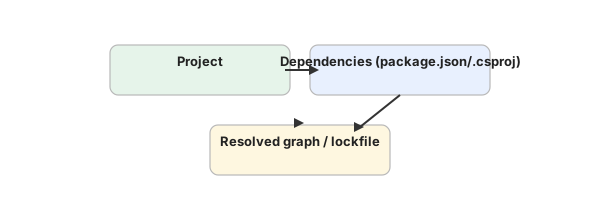
A dependency graph is the map of every package and library an application (or repository) depends on, including their transitive (nested) dependencies. Tools that produce a dependency graph inspect manifest/lock files (e.g. package.json+lockfile, *.csproj+packages.lock.json, requirements.txt, pom.xml) and record the full tree of direct and indirect packages and their versions.
Why it exists
A single package you add can pull in dozens of transitive dependencies you never see. To secure the supply chain (know what runs in your app), audit licenses, and detect vulnerable packages, teams need a complete, current map of every dependency and its version. The graph is the foundation for vulnerability scanning and version-pinning decisions.
Key ideas
- Direct vs. transitive — direct deps are declared in your manifest; transitive deps are their dependencies, recursively.
- Lock files —
package-lock.json,yarn.lock,packages.lock.json,poetry.lockpin exact versions so the graph is reproducible. - Dependency graph on GitHub/GitHub Enterprise — GitHub’s dependency graph surfaces dependencies and is tied to Dependabot alerts (dependency vulnerabilities).
- Feed analytics in Azure Artifacts — per-feed package usage/analytics show which packages consumers rely on.
- Vulnerability context — the graph links each package to known CVE databases (e.g. via Dependabot, OSV, or Azure’s dependency scanning).
How it fits
Exam notes
- The dependency graph is what lets you answer “what packages is this app using, and are they safe?”
- Lock files pin transitive versions — committing them makes dependency resolution reproducible.
- GitHub’s Dependabot uses the dependency graph to detect outdated and vulnerable dependencies and open PRs.
- Know that vulnerability fixes require bumping and re-publishing the affected package version.
Related
dependency-management · dependency-vulnerabilities · pipeline-integration · azure-artifacts · package-feed
📘 Source: Microsoft Learn — Dependency Graph
Pipeline integration (packaging in pipelines)
What it is
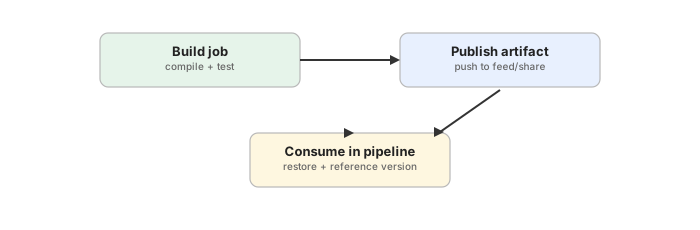
Pipeline integration is how packaging and dependency consumption plug into Azure Pipelines (and other CI/CD): pipelines restore dependencies from feeds during the build, publish newly built packages to feeds, and consume packages downstream. This is the automation layer that makes a dependency-management strategy actually run continuously.
Why it exists
Dependency management is only useful if the CI/CD pipeline actually uses it. Manually publishing packages or pointing builds at public registries defeats reproducibility. Pipeline integration automates: restore → build → test → package → publish, so every commit can flow through the same governed, versioned feed.
Key ideas
- Restore — pipeline tasks (
NuGet restore,npm install,pip,Maven) authenticate to the feed and pull dependencies; feed upstream sources supply cached external packages. - Publish — build steps produce packages and push them to a feed using the Azure Artifacts task or CLI; versioning often derived from SemVer (GitVersion,
${{ build.buildId }}, etc.). - Service connection / credentials — the Azure Artifacts service connection gives pipeline agents read/write access to feeds without hardcoding tokens.
- Conditional publishing — typically only main/
release/*branches publish to a feed; feature branches may publish to a prerelease view. - Downstream consumption — release pipelines pull the published package from the feed rather than copying build artifacts directly.
How it fits
Exam notes
- Use the Azure Artifacts service connection for feed auth in pipelines, not checked-in credentials.
- Publish from main/release branches only and use views (
@Release) for promotion; feed package versions are immutable. - Lock files (
package-lock.json,packages.lock.json) should be committed so restore is reproducible. - Enabling upstream sources in the feed means the pipeline needs no direct internet for common packages.
Related
dependency-management · azure-artifacts · package-feed · upstream-sources · build-artifact · azure-pipelines · dependency-graph
📘 Source: Microsoft Learn — Pipeline Integration