Immutable storage (WORM) for Azure Blob
What it is
Immutable storage makes blobs write-once, read-many (WORM): data can be created and read but cannot be modified or deleted for the configured period. It’s the Azure Storage compliance feature for regulatory retention (e.g., SEC 17a-4, FINRA, HIPAA).
Why it exists
Regulators require that certain records be stored unalterable and undeletable for a fixed time (to prevent tampering or malicious deletion). Immutability guarantees even a compromised admin account can’t purge the evidence during the retention window.
Key ideas
- Two forms of policy (applied at container or account-versioning level):
- Time-based retention — hold for N days; you can extend but NOT shorten/remove until expiry.
- Legal hold — no set duration; holds until explicitly cleared (applies to all blobs in scope).
- Modes:
- Governance — enabled/disabled by privileged users (still “live” admin overrides allowed with
Set-StorageBlobImmutabilityPolicy). - Compliance — irreversible; once locked, no one (even Microsoft) can reduce or remove it. Required to meet strict regulations.
- Governance — enabled/disabled by privileged users (still “live” admin overrides allowed with
- Works on top of blob versions/snapshots: blobs within scope can’t be overwritten/deleted until the policy lifts.
- Scope: container-level policy or account-level versioning immutability.
How it fits (diagram)
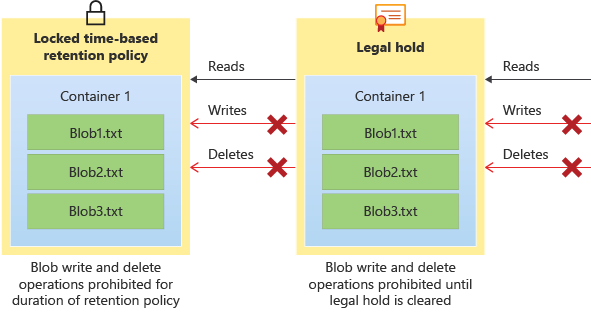
Diagrams courtesy of Microsoft Learn / Azure docs: storage/blobs/immutable-storage-overview
Exam notes
- WORM = immutable/unalterable during retention.
- Compliance-locked is bulletproof (cannot be undone); governance allows limited privileged overrides.
- Support via time-based retention and legal hold.
- Not for file shares by default — this is a blob (and account-versioning) capability.
Related
blob-storage · storage-account · access-tier
📘 Source: Microsoft Learn — Immutable Storage