Azure Blob Storage
What it is
Azure Blob Storage is Azure’s object storage service for unstructured data: images, documents, video, application logs, backups, and other files. It stores each item as a blob inside a container in a storage account. A blob is accessed by its endpoint and name, not mounted as a traditional disk by default.
Why it exists
Applications need cheap, massively scalable storage for binary/unstructured payloads that isn’t tied to a filesystem or a database schema. Blobs support trillions of objects and PB-scale, with tiered pricing.
Key ideas
- The practical hierarchy is storage account → container → blob. Slashes in a blob name can look like folders, but a normal blob namespace is flat unless you enable a hierarchical namespace for a supported scenario.
- Block blobs are the usual choice for documents and media. Append blobs are designed for append-heavy log-like data. Page blobs support random read/write patterns and are used for VHD scenarios such as unmanaged disks.
- Access tiers and lifecycle rules can move or remove data to manage cost. Changing a tier does not create a safety copy.
- Versioning, soft delete, snapshots, and immutability can help protect data from different kinds of mistakes. Select and test the controls that match the recovery requirement.
Northwind example
Northwind puts customer receipt images in an receipts container. Each receipt is a block blob whose name includes an order reference. The ordering app uses its workload identity to write new images; staff do not receive a shared storage key. Northwind uses lifecycle rules for older receipts and data-protection features for accidental deletion. The images are objects in Blob Storage, not files on the web server’s disk.
Common confusion
- A container is an organization and access boundary inside a storage account; it is not a Windows folder or an Azure resource group.
- Blob Storage can expose public access only when deliberately configured. A guessable URL is not an access-control design.
- Storage redundancy handles infrastructure copies. Object versioning, soft delete, immutability, and backup address different data-loss risks.
How it fits (diagram)
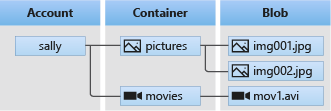
Diagrams courtesy of Microsoft Learn / Azure docs: storage/blobs/storage-blobs-introduction
Where it appears in the route
Start with storage-account and redundancy-lrs-zrs-grs, then use access-tier and storage-network-rule to design cost and access.
Related
storage-account · access-tier · storage-performance · azure-tables · azure-queues · immutable-storage · redundancy-lrs-zrs-grs · northwind-traders-case-study
📘 Source: Microsoft Learn — Introduction to Azure Blob Storage, checked 2026-09-16. Re-audit when Blob Storage resource types, access tiers, or authorization guidance changes.