Virtual Network Peering
What it is
Virtual Network Peering (VNet peering) connects two virtual networks over Microsoft’s private backbone. It gives their resources a direct private network path, without a public-internet path or a VPN gateway between those two VNets.
Why it exists
Applications often span separate VNets for teams, tiers, regions, or subscriptions. Peering gives a direct path between them while preserving separate VNet boundaries and address spaces.
Key ideas
- Two links: both directions must exist and be connected. Creating only one leaves the peering in an initiated state.
- No overlap: the VNets cannot have overlapping address spaces.
- Local or global: regular peering connects VNets in one region; global peering connects across regions. Peering can cross subscriptions and Entra tenants when permissions and requirements are met.
- Non-transitive: A ↔ B and B ↔ C does not automatically create A ↔ C. Add a direct peering or deliberately route through a hub with UDRs and an appliance/gateway.
- Gateway transit: a spoke can use a remote VPN or ExpressRoute gateway in a hub for hybrid connectivity. A VNet using a remote gateway cannot also have its own gateway.
- Private path, separate controls: peering creates connectivity, not permission. NSGs, routes, firewalls, and application authorization still decide what traffic and actions are allowed.
How it fits
              [hub VNet]
  spokeA ─────┘    │    └──── spokeB
  peer links on each side only
  (non-transitive: spokeA needs a direct peering or designed hub route to reach spokeB)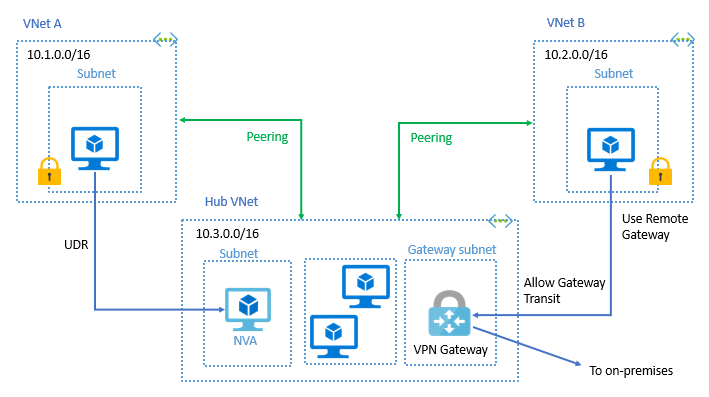
Diagrams courtesy of Microsoft Learn / Azure docs: virtual-network/virtual-network-peering-overview
Northwind example
Northwind peers its ordering VNet (spoke) with its shared-services VNet (hub), where a VPN gateway reaches the warehouse. The warehouse route works only after gateway transit is correctly configured. If the ordering VNet must reach a second spoke through a firewall in the hub, Maya adds intentional UDRs and tests both directions; peering by itself does not relay one spoke through another.
Cost and troubleshooting
Azure charges for data transferred across a peering connection. Check current pricing when cost matters. To troubleshoot, examine the NIC’s effective routes and use Network Watcher connectivity checks; an apparently connected peering can still be blocked by a route or NSG.
Related
Home · vnet · subnet · route-table · vpn-gateway · virtual-wan