Route Tables & User-Defined Routes (UDR)
What it is
A route table is a collection of directions attached to a subnet. Each direction says, “for an address in this range, send traffic to this next place.” Azure supplies system routes automatically; directions you add are user-defined routes (UDRs).
Think of it as road signs for packets. A route decides where traffic goes next. It does not decide whether that traffic is safe, allowed, or authenticated.
Why it exists
Azure can route ordinary VNet, peered-VNet, and internet-bound traffic without a route table. A team adds UDRs when it needs a deliberate path—for example, to send a subnet’s outbound traffic to Azure Firewall for inspection, or to send spoke-to-spoke traffic through a hub.
How Azure chooses a route
- Azure combines applicable system routes, UDRs, and routes learned through BGP.
- It normally selects the route with the most-specific matching address prefix. For the same prefix, a UDR takes precedence over BGP, which takes precedence over a system route.
- Some Azure-managed system routes—for VNet, peering, and service-endpoint traffic—have special precedence. Do not assume every system route can be overridden; inspect the effective routes on the NIC when troubleshooting.
One route table can be associated with a subnet, and that table can be associated with multiple subnets. A table with no subnet association has no effect.
Common next hops
- Virtual appliance: an appliance private IP, such as a firewall or NVA. It must be able to forward the traffic; Azure does not turn an ordinary VM into a router automatically.
- Virtual network gateway: sends traffic to a gateway, commonly for a connected on-premises network.
- Internet: sends traffic toward the internet.
- None: drops traffic matching the prefix.
Azure also creates system routes for paths such as local VNet and peering traffic. They are not UDR next-hop choices you manually create.
Northwind example
Northwind Traders puts its ordering VMs in snet-orders. Maya associates a route table with that subnet and adds 0.0.0.0/0 → Virtual appliance: 10.10.1.4, the private address of Azure Firewall. Now ordinary internet-bound traffic goes to the firewall first. The firewall’s rules decide whether to allow it; an NSG and the app’s own authorization still have separate jobs.
This is called forced tunneling. It is useful only if the firewall route, forwarding configuration, and return path are designed together. A bad route can cut off the workload or create a routing loop.
How it fits
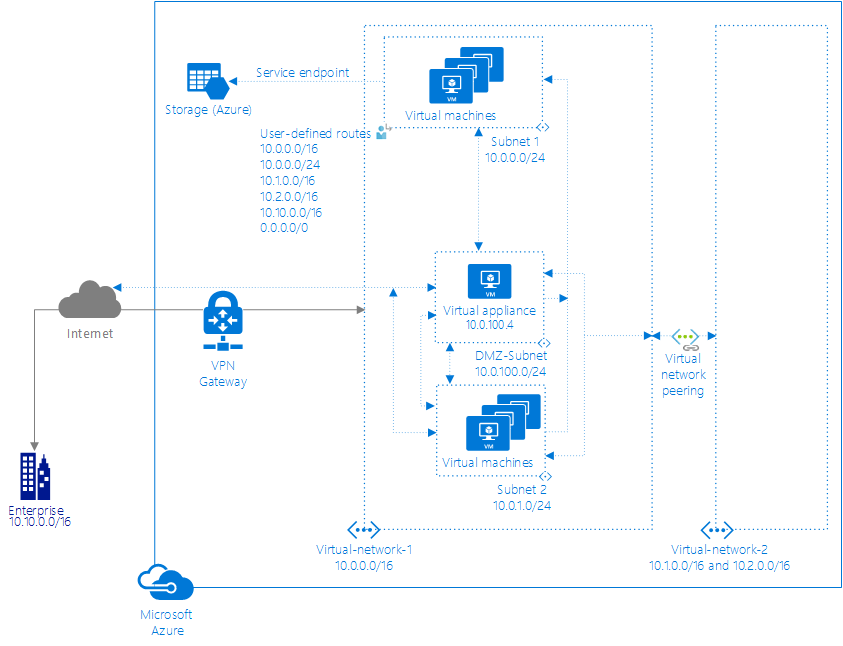
Diagrams courtesy of Microsoft Learn / Azure docs: virtual-network/virtual-networks-udr-overview
Customer VM (snet-app) ──► route table UDR: 0.0.0.0/0 next hop Azure Firewall
                                        │
                                        ▼
                              Azure Firewall (inspect/filter)
                                        │
                                   to internet
Avoid these mix-ups
- A route table chooses a path; an nsg filters network flows; rbac controls who may manage Azure resources. None replaces the others.
0.0.0.0/0means “all IPv4 destinations not matched by a more-specific route.” It is powerful and should be tested before association.- An appliance usually belongs in a different subnet from the workloads it serves. It needs IP forwarding enabled in Azure and may also need forwarding enabled in its operating system or appliance configuration.
Related
Home · subnet · vnet · bgp · azure-firewall · vnet-peering · network-watcher