AZ-400: Manage Infrastructure as Code

Manage Infrastructure as Code — MOC

MS Learn path: Manage infrastructure as code using Azure · Prophecy: environments built from code, not clicks.

Planned concepts

IaC · Bicep · ARM templates · terraform · desired-state · configuration-drift · provisioning-pipeline · immutable-infrastructure

Modules in this path

Skills

Declarative provisioning, config management, drift.

Practice questions

Introduction to Infrastructure as Code

MS Learn module: Explore infrastructure as code · Learning objectives: explain what infrastructure as code (IaC) is, why it’s a core DevOps practice, and contrast declarative vs imperative / inferential provisioning.

Overview

The entry point to the “Manage infrastructure as code using Azure” path. It frames infrastructure-as-code as the umbrella practice: defining Azure resources as versioned, reviewable code instead of Portal clicks, and explains the two families of tooling (declarative templates vs configuration management) and why idempotent, desired-state is the goal.

Units / lessons covered

  • What is infrastructure as code and why it matters to DevOps
  • Declarative (bicep / arm-template / terraform) vs imperative (CLI runbooks)
  • Desired state and idempotency; drift as the failure mode
  • az deployment what-if / terraform plan as the “preview” step

Key terms / commands

  • Declarative vs imperative · idempotent · desired state · az deployment group what-if · terraform plan · az deployment validate

Hands-on / what to try

Compare a one-off az vm create (imperative) against the same resource declared in a .bicep file; run terraform plan on a returned template to see the diff-before-apply model.

Exam focus

  • Know IaC = declarative + idempotent + versioned; the exam opens every IaC question with these properties.
  • Contrast the template layer (bicep/arm-template) with config-management (inside-VM) state.

Path MOC · use-bicep-arm · terraform-in-azure · configuration-and-drift

Use Bicep and ARM templates

MS Learn modules: Explore Azure deployments with ARM templates · Use Bicep to declaratively deploy your Azure infrastructure · Learning objectives: author and deploy Azure infrastructure with bicep and ARM templates, understand scopes, parameters, loops, modules, and safe preview/what-if deployment.

Overview

The Azure-native IaC stack. ARM templates (JSON) are the deployment engine’s format; Bicep is a concise DSL that transpiles 1:1 to ARM JSON — two views of the same deployment. This module covers authoring, parameterizing, modularizing, and safely shipping Bicep through a provisioning-pipeline.

Units / lessons covered

  • ARM template anatomy: $schema, contentVersion, parameters, variables, resources, outputs
  • Bicep authoring: parameters, variables, modules, loops, conditional/dependsOn
  • Deployment scopes: resource group vs subscription/management group/tenant
  • az deployment group what-if / create and incremental vs complete modes
  • Deploying Bicep/ARM from Azure Pipelines or GitHub Actions

Key terms / commands

  • bicep build · az deployment group create -f main.bicep · az deployment group what-if · @displayName · module, param, var, output · %TARGETSCOPE% (rg/sub/mg/tenant) · parameter files (main.bicepparam / .parameters.json)

Hands-on / what to try

Author a main.bicep with a parameterized storage account + VM, run az deployment group what-if to preview changes, then deploy. Extract a nested module and re-wire it with an explicit dependsOn.

Exam focus

  • Bicep → ARM: they are the same deployment; Bicep is not a different engine.
  • Incremental leaves undeclared resources alone; complete deletes them (drift vs cleanup trade-off).
  • Preview every deployment with what-if; know resource-group vs subscription scopes.

Path MOC · intro-infrastructure-as-code · terraform-in-azure · configuration-and-drift

Terraform in Azure

MS Learn module: Create infrastructure with Terraform in Azure · Learning objectives: use HashiCorp Terraform with the AzureRM provider to provision and manage Azure resources, orchestrate plan/apply, and store state remotely.

Overview

Covers the cross-cloud IaC option in the path. Unlike Azure-only Bicep/ARM templates, terraform manages Azure (and other clouds) via providers, uses HCL, and tracks what it owns in a state file — which must be stored remotely and locked for team use.

Units / lessons covered

  • HCL syntax: resource, data, variable, output, module
  • AzureRM provider; azurerm_resource_group, azurerm_storage_account, etc.
  • terraform initplanapplydestroy lifecycle
  • Backend state on an Azure Storage account (blob) with locking; azurerm_backend
  • Running Terraform in a provisioning-pipeline (Azure Pipelines/GitHub Actions) and drift detection via plan

Key terms / commands

  • terraform init · plan · apply · destroy · .tf / .tfvars · azurerm provider · backend "azurerm" · terraform.tfstate · state locking

Hands-on / what to try

Write a main.tf creating a resource group + storage account, terraform init/plan/apply, then terraform state list and terraform plan again to see it converge. Manually delete/resize a resource in the Portal and re-run plan to observe drift.

Exam focus

  • State file ownership and remote backend + locking is the classic Terraform-on-Azure exam point (Storage account as backend).
  • plan = preview + drift detector; apply = reconcile to desired-state.
  • Contrast: Bicep/ARM have no state file (Azure is the source of truth); Terraform keeps explicit state.

Path MOC · intro-infrastructure-as-code · use-bicep-arm · configuration-and-drift

Configuration and drift management

Learning objectives: keep deployed environments in the declared state — detect drift between desired and actual configuration, and manage configuration (parameters, secrets, policies) so environments stay reproducible.

Overview

IaC is only as good as its ability to hold the line. This module covers the two ends of the problem: configuration management — feeding runtime config (parameters, secrets from Azure Key Vault, App Configuration, policies) into deployments — and drift management — noticing and fixing when the live environment disagrees with the desired-state in code.

Units / lessons covered

  • Parameters and parameter files per environment (dev/stage/prod) reused across a provisioning-pipeline
  • Secrets & config from managed sources (Azure Key Vault, App Configuration) rather than baked into templates
  • Azure Policy to enforce/comply desired state and block drift-causing misuse
  • Drift detection: az deployment what-if, terraform plan, config-management agents (DSC/Ansible)
  • Reconciling vs absorbing drift; immutable approach to prevent it

Key terms / commands

  • az deployment group what-if · terraform plan · parameter files (.bicepparam / .parameters.json) · Key Vault references · App Configuration · Azure Policy deployIfNotExists · runtime parameter substitution

Hands-on / what to try

Deploy the same Bicep to dev/stage/prod with distinct parameter files; change a resource in the Portal and catch it with az deployment what-if; add an Azure Policy that re-asserts (or blocks) the desired SKU.

Exam focus

  • Detect → decide: reconcile (re-apply desired) or absorb (promote the change into code) — pick by whether the change is wanted.
  • Drift lives at both layers: resource template and inside-VM config.
  • Immutability (replace, don’t patch) is the admission ticket to low-drift environments.

Path MOC · intro-infrastructure-as-code · use-bicep-arm · terraform-in-azure

Infrastructure as Code (IaC)

What it is

Infrastructure as Code (IaC) is the practice of defining and managing your Azure infrastructure — VMs, networks, storage, policies — as machine-readable definition files stored in version control, instead of configuring resources by hand in the Portal or with one-off CLI commands. Tools like Bicep, ARM templates and terraform describe the target state and Azure (or the tool’s provider) makes the live environment match it.

Why it exists

Clicking through the Portal is fast for one box but not repeatable, auditable, or portable. IaC turns infrastructure into code so it gets the same benefits as application code: version history, code review, peer validation, rollback, reusability, and reproducibility across dev → test → prod. It also powers the DevOps loop — the same definition can run in CI/CD through a provisioning-pipeline.

Key ideas

  • Declarative, not imperative: you say what you want (a VM with this NIC and tier), not how to build it step by step. The engine figures out the diff and applies only the changes needed.
  • Idempotent: running the same definition twice converges to the same end state — no duplicate resources, no “already exists” errors.
  • Versioned & reviewed: definitions live in git; changes go through pull requests and code review.
  • Environments from the same source: one definition parametrized by environment (dev/stage/prod) gives parity and removes environment drift at deploy time.
  • Supports both “speed” and “safety”: enables blue/green & canary rollouts and true immutable infrastructure.

How it fits (diagram)

Exam notes

  • IaC = the umbrella term; Bicep/ARM templates are Azure-native, terraform is cross-cloud.
  • Core exam contrast: imperative (CLI scripts, az one-liners, runbooks) vs declarative (templates) — declarative + idempotent is the IaC ideal.
  • IaC is a pillar of the AZ-400 value stream: source control → CI → IaC → releases.

bicep · arm-template · terraform · desired-state · configuration-drift · immutable-infrastructure · provisioning-pipeline

📘 Source: Microsoft Learn — Infrastructure As Code

Bicep

What it is

Bicep is a domain-specific language (DSL) that lets you define Azure infrastructure declaratively as code, with an easy-to-read, concise syntax. It transpiles to ARM template JSON before deployment, so it is a friendlier authoring layer over the same Azure Resource Manager deployment engine.

Why it exists

ARM templates (JSON) are verbose, hard to read, and error-prone. Bicep gives you the same declarative infrastructure-as-code power — variables, parameters, modules, loops, conditions, dependencies — with syntax like a modern language, plus native tooling (formatter, linter, VS Code extension, preview of changes).

Key ideas

  • Transpilation: bicep build compiles a .bicep file → ARM JSON; you deploy that, or deploy .bicep directly (az deployment group create -f main.bicep).
  • Declarative: you state the target state; ARM computes the diff from current state and applies it (idempotent, no re-provisioning of unchanged resources).
  • Modules (module child './x.bicep') reuse template pieces; parameters and variables make templates configurable.
  • Resource dependencies are inferred automatically (Bicep figures out the order).
  • Compiles to full ARM JSON → all ARM features (expression evaluation, functions) still apply.

How it fits (diagram)
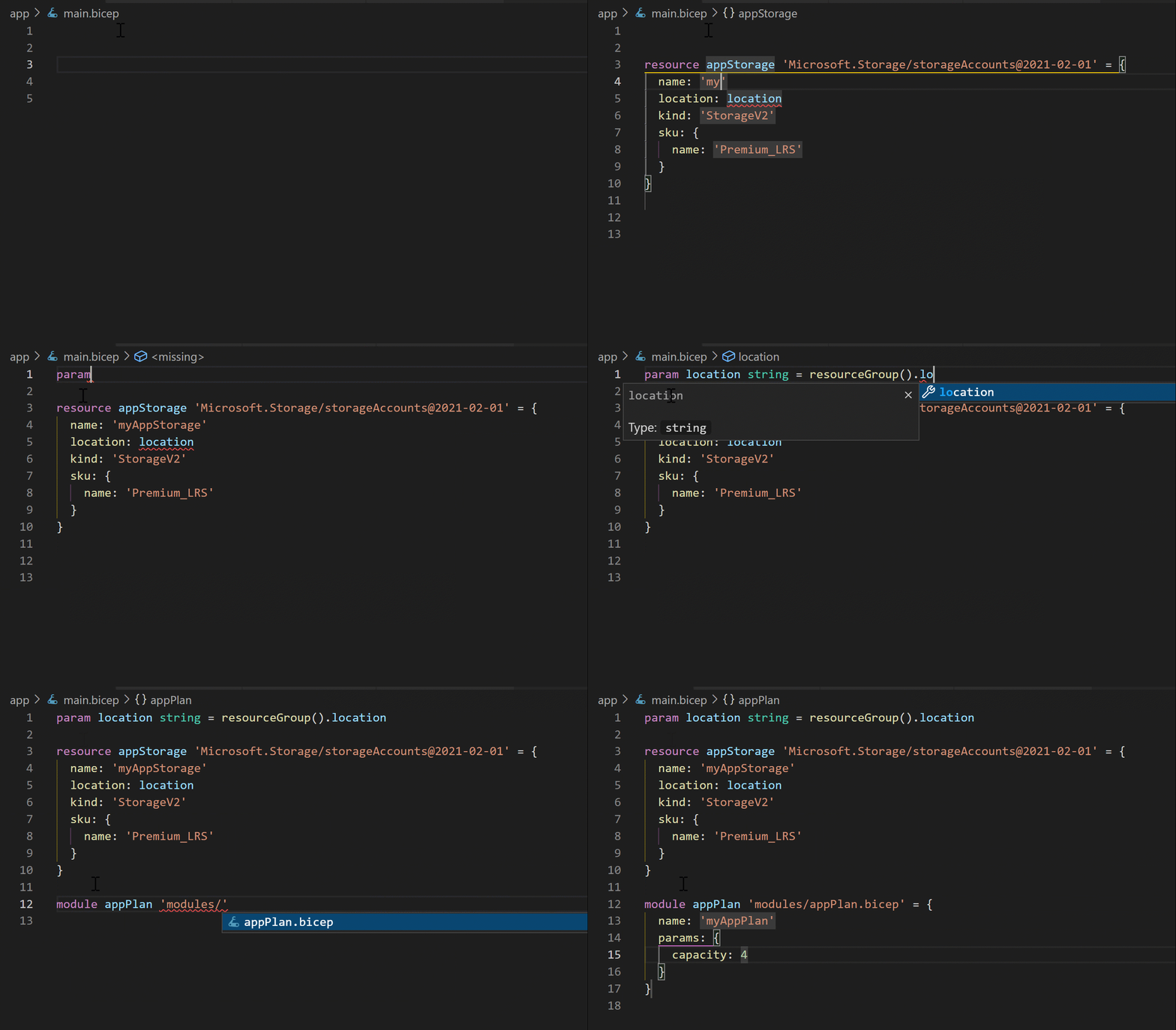
bicep - Microsoft diagram

Diagrams courtesy of Microsoft Learn / Azure docs: azure-resource-manager/bicep/overview

Exam notes

  • Bicep compiles to (maps 1:1 to) an ARM template — they are two views of the same deployment.
  • Files end in .bicep; az deployment targets resource-group or subscription scope.
  • In AZ-104 pop quiz: “declarative, readable language for Azure IaC”Bicep (vs imperative CLI/portal); preferred over hand-writing JSON.
  • Same deployment engine as ARM templates → idempotent diff-based apply.

Path MOC · arm-template · azure-cli · azure-vm

📘 Source: Microsoft Learn — Bicep

ARM templates

What it is

An ARM template is a JSON file that declaratively describes the resources you want to deploy to Azure and their relationships, in a logical object model. Azure Resource Manager reads it and provisions the resources idempotently — it diffs against the current state and applies only the changes needed to reach the declared goal.

Why it exists

Clicking through the Portal or imperative CLI is fine for one resource but not reproducible or auditable for a fleet. Templates make infrastructure code: versioned in git, reviewed, reused with parameters, and safely re-run (no surprise re-provisions).

Key ideas

  • Idempotent / declarative: re-deploying the same template brings resources to the declared state — unchanged ones are left alone.
  • Structure (top-level elements): $schema, contentVersion, parameters, variables, functions, resources, and outputs.
  • Scope: resource-group, subscription, management group, or tenant deployment.
  • You can deploy incrementally (default) or complete; type parameters make templates reusable.
  • Bicep is a modern DSL that compiles down to these JSON templates (same engine). Could use ConvertTo-Json/portal “Export template” to get a starting point.
  • Deploy via Portal, Azure CLI (az deployment), PowerShell, or Azure DevOps/GitHub Actions.

How it fits (diagram)

arm-template.svg

Exam notes

  • ARM template vs MPI (managed identity): not related — templates are IaC.
  • Incremental vs complete deployment modes: incremental only adds/changes listed resources; complete deletes resources in the RG not in the template (dangerous — default is incremental).
  • Linked/nested templates with deployments resource for modularity.
  • Exam: recognize template JSON anatomy and that it’s declarative + idempotent.

Path MOC · bicep · azure-cli · azure-vm

📘 Source: Microsoft Learn — Arm Template

Terraform

What it is

Terraform (HashiCorp) is an open-source cross-cloud infrastructure as code tool. You write infrastructure in HCL (HashiCorp Configuration Language), and Terraform’s providers translate that into API calls for many clouds — including the AzureRM and AzureAD providers for Azure. Terraform keeps a state file that records what it has created, and compares desired vs. current state before each apply.

Why it exists

Organizations are multi-cloud / hybrid. An Azure-only DSL like Bicep or ARM templates can’t manage AWS, GCP, or on-prem in one language. Terraform gives a single declarative workflow and model across every provider, plus a huge public module registry and mature plan/apply lifecycle.

Key ideas

  • HCL syntax: .tf files declare resources, data sources, variables, outputs, and modules.
  • Plan / Apply loop: terraform plan shows the diff (+ change / ~ update / - destroy); terraform apply executes it — the equivalent of desired-state reconciliation.
  • State file (terraform.tfstate): the source of truth for mapping resources to real objects; must be stored remotely (e.g. Azure Storage with locking) for team use.
  • Providers: plugin resolvers (AzureRM, AWS, GCP, kubernetes); azurerm manages Azure resources, azurerm_backend for state.
  • Integration with Pipelines/GitHub Actions: Terraform tasks in Azure Pipelines or GitHub Actions run init → plan → apply as a provisioning-pipeline.

How it fits (diagram)
terraform - Microsoft diagram

Diagrams courtesy of Microsoft Learn / Azure docs: azure/developer/terraform/overview

Exam notes

  • Compare to Bicep: Bicep = Azure-only, transpiles to ARM, no state file (ARM refreshes from live). Terraform = multi-cloud, HCL, explicit state, third-party.
  • Know terraform init (download providers), plan, apply, destroy, and remote state locking.
  • Terraform drift detection: terraform plan against live cloud reveals manual changes → configuration drift.

infrastructure-as-code · bicep · arm-template · desired-state · configuration-drift · provisioning-pipeline

📘 Source: Microsoft Learn — Terraform

Desired state

What it is

Desired state is the declared target — the authoritative description of how infrastructure and configuration should be at the end. In IaC, your definition file (bicep, ARM template, terraform, or a config-management manifest) is the desired state. The tooling’s job is to reconcile reality toward that state: compare current vs. desired, then change or delete what doesn’t match.

Why it exists

Without a declared target, you can only react to what’s already wrong (“someone changed the VM SKU — now what should it be?”). A desired-state model makes the end-state explicit, versioned, and verifiable, so applying it repeatedly is safe and environments converge instead of drifting.

Key ideas

  • Declarative = desired state: you describe the end, not the steps. ARM/Bicep/Terraform all reconcile toward the declared state.
  • Reconciliation (idempotent): resources already in the desired state are left untouched; only differences are acted on.
  • Convergence: repeated applies drive the environment to the declared state, even after manual tampering — a first line of defense against drift.
  • Config management angle: tools like DSC / Ansible / Chef also enforce a desired state for inside-the-VM configuration (packages, services, registry), complementing template-level IaC which manages the resource layer.

How it fits (diagram)

Exam notes

  • With incremental ARM deployment mode, resources omitted from the template are left in place (→ potential drift); with complete mode they are deleted to match desired state (dangerous).
  • Desired-state thinking is what makes IaC idempotent and re-runnable — a recurring AZ-400 theme.
  • Contrast imperative (runbook of steps) vs desired-state (declared end): desired-state is the IaC best practice.

infrastructure-as-code · bicep · arm-template · terraform · configuration-drift · immutable-infrastructure

📘 Source: Microsoft Learn — Desired State

Configuration drift

What it is

Configuration drift is the silent divergence between an environment’s desired state (what your IaC defines) and its actual running state (what’s really deployed). It happens when someone changes a resource outside the approved definition — the old manual “fix” in the Portal, an ad-hoc az command, or a hotpatch on a server.

Why it exists

Drift is the natural enemy of IaC. If reality and code disagree, then: the definition no longer represents production, the next apply can overwrite or delete the ad-hoc change, environments differ from each other, and reproducibility and auditability break down. Detecting and resolving drift is what keeps “everything as code” truthful.

Key ideas

  • Sources of drift: hand edits in the Portal, emergency imperative commands, scripts/apps that change resources, human error, or missing resources.
  • Detection: run terraform plan (or az deployment what-if for ARM/Bicep) against live Azure to surface un-declared changes. Config-management agents (DSC/Ansible) periodically re-assert inside-VM state.
  • Resolution: either re-apply desired state (converge back) or adopt the change into the code (update the definition to match reality — the legitimate fix).
  • Prevention via immutable infrastructure and pipelines: no writes outside the definition, write-only permissions, and gate changes through PRs.

How it fits (diagram)

Exam notes

  • Know the two responses to drift: reconcile (apply desired state) vs absorb/update the manifest — pick based on whether the change is wanted.
  • az deployment group what-if and terraform plan are your drift-detection commands.
  • Acuity: template-level IaC does not enforce inside-VM config — validate drift at both the resource layer and the OS/app layer.

desired-state · infrastructure-as-code · terraform · bicep · arm-template · immutable-infrastructure

📘 Source: Microsoft Learn — Configuration Drift

Immutable infrastructure

What it is

Immutable infrastructure is the practice of never modifying a running server or resource after it’s deployed. To change something, you replace it: build a new version from your IaC definition, deploy it alongside, and shift traffic to it — then tear the old one down. It’s the polar opposite of mutable servers that are patched, hot-fixed, and drifted over time.

Why it exists

Mutable servers accumulate configuration drift: each ad-hoc ssh fix and manual patch makes the machine different from its neighbors and from the code that created it — “works on my machine” at fleet scale. Immutable infrastructure guarantees the running environment is byte-identical to the validated definition, removing whole classes of “but it works in prod” bugs, making rollback trivial, and aligning perfectly with desired-state IaC.

Key ideas

  • Build & replace, not patch: Az PowerShell/Bicep/Terraform create a new deployment; image-based (Packer/VM image, container images, or az vm image) provisioning bakes config in at build time.
  • Pairing with deployment patterns: blue/green and canary / rolling deliver immutable units; health checks decide promotion.
  • Self-healing: because deployments are identical, rolling, automatic rollback to the last-good artifact is clean ([[build-artifact]] is reproducible).
  • Emphasis on config at build time: secrets and settings come from managed sources (Key Vault, App Configuration) so images stay generic and reusable.
  • Drift-proof: nothing to drift — no in-place state, no snowflake servers. Any manual write is rejected or simply lost on replace.

How it fits (diagram)

Exam notes

  • Know the contrast: mutable (patch in place, vulnerable to drift) vs immutable (replace, reproducible). AZ-400 favors immutable.
  • Immutability + IaC = the cure for drift.
  • Ties to VM scale sets, containerized workloads, and blue/green & canary strategies — replace the unit, never re-spin config.

infrastructure-as-code · desired-state · configuration-drift · blue-green-deployment · canary-deployment · build-artifact

📘 Source: Microsoft Learn — Immutable Infrastructure

Provisioning pipeline

What it is

A provisioning pipeline is the automated release process that takes your IaC definitions (bicep, ARM templates, or terraform) from source control and deploys them to Azure as a repeatable, gated Continuous Delivery flow — instead of running az deployment or terraform apply by hand. In Azure Pipelines or GitHub Actions this is a dedicated pipeline job/stage that init, plans, validates, and applies the infrastructure per environment.

Why it exists

Deploying infrastructure by hand is inconsistent and ungoverned. A provisioning pipeline gives infrastructure the same rigor as application code: CI on the definition (lint, validate, cost, what-if/plan), pull-request gating, separation of environments (dev → stage → prod), approvals and gates, and a rollback path — all with full history.

Key ideas

  • Stages mirror environments: build the artifact once, then deploy the definition to dev/stage/prod with environment-specific parameters.
  • Validation before apply: run Bicep lint + az deployment what-if / terraform plan; fail the pipeline instead of mis-provisioning.
  • Service connection / identity: the pipeline authenticates via a service principal (or managed identity) with least-privilege RBAC on the target scope — never a user’s credentials.
  • Reusability: template modules + parameter files keep the pipeline DRY; the same YAML drives all environments.
  • Guardrails: approvals & deployment gates on prod, locking of resource groups, and soft-delete/lock policy for protection.

How it fits (diagram)

Exam notes

  • The provisioning pipeline is the place AZ-400 tests IaC: parameter files per environment, service connections, what-if/plan gates, and deployment rings.
  • Know the flow for ARM/Bicep (az deployment group/sub what-if then create) and Terraform (initplanapply, backend on Storage account).
  • Key contrast: provisioning pipeline manages the resource layer; config-management agents handle inside-VM state — both are part of IaC governance.

infrastructure-as-code · bicep · arm-template · terraform · cd · azure-pipelines · deployment-gate

📘 Source: Microsoft Learn — Provisioning Pipeline

Azure Pipelines

What it is

Azure Pipelines is the CI/CD service inside Azure DevOps that automatically builds, tests, and deploys code. It runs cross-platform (Linux, macOS, Windows) and supports every major language and both private and public cloud targets.

Why it exists

Continuous integration means compiling and validating code on every change so integration problems surface immediately instead of at release time. Azure Pipelines provides a scalable, repeatable execution engine that runs your build/test steps on Microsoft-hosted agents (or your own) with secrets, caching, and release tooling built in.

Key ideas

  • CI (continuous integration) builds & tests on every commit/PR; CD (continuous delivery) deploys the built artifact.
  • Pipelines as code — defined in YAML (recommended) or in the classic visual designer (legacy).
  • Trigger — CI/PR/scheduled triggers start a run; see ci-trigger.
  • Jobs/steps/tasks — the execution model; see jobs-steps.
  • Runs on agents & pools — Microsoft-hosted or self-hosted.
  • Free for public projects; private repos get a monthly free allocation of Microsoft-hosted minutes.

Exam notes

  • YAML-first is the current, recommended way to define pipelines (the classic editor is legacy/being phased out).
  • Azure Pipelines supports both CI and CD; the “release pipeline” concept still exists in classic mode.
  • azure-pipelines.yml is the conventional filename.
  • Pools: Microsoft-hosted (ubuntu-latest, windows-latest, macos-latest) vs self-hosted.

pipeline-yaml · agent-pool · jobs-steps · build-artifact · pipeline-templates · github-actions · self-hosted-agent

Diagram
azure-pipelines - Microsoft diagram

Diagrams courtesy of Microsoft Learn / Azure docs: azure/devops/pipelines/get-started/what-is-azure-pipelines

📘 Source: Microsoft Learn — Azure Pipelines