Azure Queue storage
Canonical explanation
This legacy title is retained so existing links continue to work. Read Azure Queue Storage for the complete beginner explanation, Northwind example, delivery caveats, and current source record.
What it is
Azure Queue Storage holds messages that describe work waiting for a worker. A sender can add a small message and continue; a worker processes it later. This is called asynchronous processing.
Why it exists
A queue absorbs a temporary burst of work, such as “make a receipt” or “resize an image,” so the customer-facing application does not wait for the slow task to finish.
Key ideas
- A queue belongs to a storage account and holds messages up to 64 KB.
- A worker receives a message, processes it, and deletes it only after success. A visibility timeout can make an unfinished message available again for retry.
- Do not assume exactly-once or strict FIFO delivery. Workers must tolerate duplicate delivery and monitor repeated failures.
- Use Azure Service Bus when the requirement needs richer broker capabilities such as topics or sessions.
How it fits (diagram)
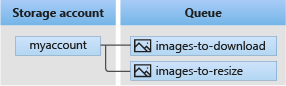
Diagrams courtesy of Microsoft Learn / Azure docs: storage/queues/storage-queues-introduction
Exam notes
- Queue Storage is for durable work messages, not a business-data archive.
- Receiving is not deleting: delete only after successful processing.
- See queue-storage for the full decision and implementation explanation.
Related
storage-account · azure-tables · blob-storage · queue-storage
📘 Source: Microsoft Learn — Azure Queue Storage