Azure Load Balancer
What it is
Azure Load Balancer is a Layer 4 network load balancer. It distributes TCP, UDP, and related transport-level traffic from a frontend IP to healthy backend instances such as VMs or VM scale-set instances. It sees network connections, not web concepts such as URL paths or HTTP headers.
Why it exists
A single VM is a single point of failure and a capacity ceiling. Load Balancer spreads traffic and handles failover/health so a collection of backends appears as one reliable service, without adding latency (it’s a pass-through forwarder).
Key ideas
- A public load balancer accepts traffic at a public frontend IP. An internal load balancer exposes a private frontend IP inside a VNet or connected network. Public and internal describe the frontend reachability, not whether the backend VMs have public IPs.
- A frontend IP, backend pool, health probe, and load-balancing rule work together. The probe decides which backends are eligible; the rule maps matching connection traffic to that healthy pool.
- A failed health probe removes a backend from new traffic. It does not repair the application, its data, or every existing user connection.
- Load Balancer operates at Layer 4. For HTTP(S)-aware functions such as path routing, host routing, TLS termination, or web-application firewall rules, use Application Gateway instead.
- Load Balancer features depend on the SKU and configuration. Choose current supported options for the target region rather than carrying historical Basic-versus-Standard assumptions into a new design.
Northwind example
Northwind runs two VM instances of its legacy order connector. An internal Load Balancer has a private frontend address and sends TCP traffic to the healthy connector instance. Its health probe stops sending new connections to an instance that fails the check. The load balancer helps the two instances appear as one network endpoint; Northwind still needs shared data, secure rules, monitoring, and a plan for the database.
Common confusion
- Load Balancer distributes connections; it is not a web application firewall, DNS service, or global traffic manager.
- A public frontend makes that frontend reachable from the internet only when the surrounding network and security configuration permits it.
- A healthy TCP probe only proves the probe’s condition. It does not prove a customer checkout succeeds.
How it fits
[Internet] ──► [LB public frontend 20.x.x.x]
                      │  health probe + rule
              ┌───────┼────────┐
           [VM1]   [VM2]   [VM3]   (backend pool, TCP 443)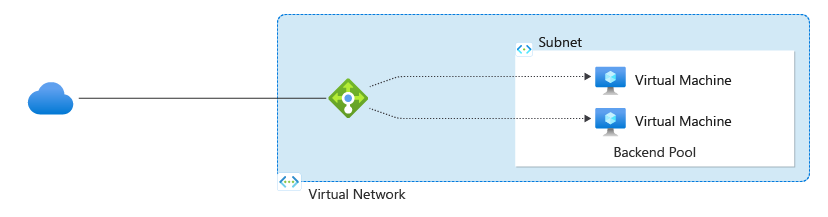
Diagrams courtesy of Microsoft Learn / Azure docs: load-balancer/load-balancer-overview
Design check
Decide whether clients are public or private, which protocol and port must be distributed, what health condition represents a usable backend, how outbound traffic is designed, and whether the app needs Layer 7 routing instead. Test failure behavior before calling the workload highly available.
Related
application-gateway · traffic-manager · azure-front-door · vnet · subnet · nsg · virtual-machine-scale-set · northwind-traders-case-study
📘 Source: Microsoft Learn — What is Azure Load Balancer?, checked 2026-09-16.