Availability set
What it is
An availability set is a logical group for two or more VMs that reduces the chance that related VMs fail or restart together. Azure spreads the VMs across fault domains and update domains inside a region. It is especially useful in a region that does not support availability zones, but it has less isolation than zones.
Why it exists
A single VM sits on one physical host — any host/rack failure or Azure patch cycle could kill it. Availability sets arrange VMs across independent failure boundaries for 99.95% service-level availability, without needing multiple regions.
Key ideas
- A fault domain is a group of infrastructure that can share a power source and network switch. Spreading VMs reduces the risk of one physical issue taking every copy down.
- An update domain is a group that Azure can restart together during planned maintenance. Azure works through update domains rather than intentionally restarting all of them at once.
- Use at least two functioning application instances and a way to send clients to a healthy instance. The availability set supplies placement; it does not route traffic, replicate data, or fix application bugs.
- An availability set works within a region and can still be affected by a datacenter-level failure. Availability zones provide a stronger physical-fault boundary when supported.
Northwind example
In a region without availability zones, Northwind places two warehouse connector VMs in one availability set and uses a health-aware internal load-balancing design. During planned maintenance, one update domain can restart while the other connector remains available. If the connector database is a single point of failure, the availability set does not solve that separate problem.
Common confusion
- An availability set is not an auto-scaling group. It does not add VMs when demand rises.
- It is not a backup or disaster-recovery solution for a full regional outage.
- You cannot make one VM highly available merely by naming or attaching it to an availability set; the application needs multiple usable instances.
How it fits (diagram)
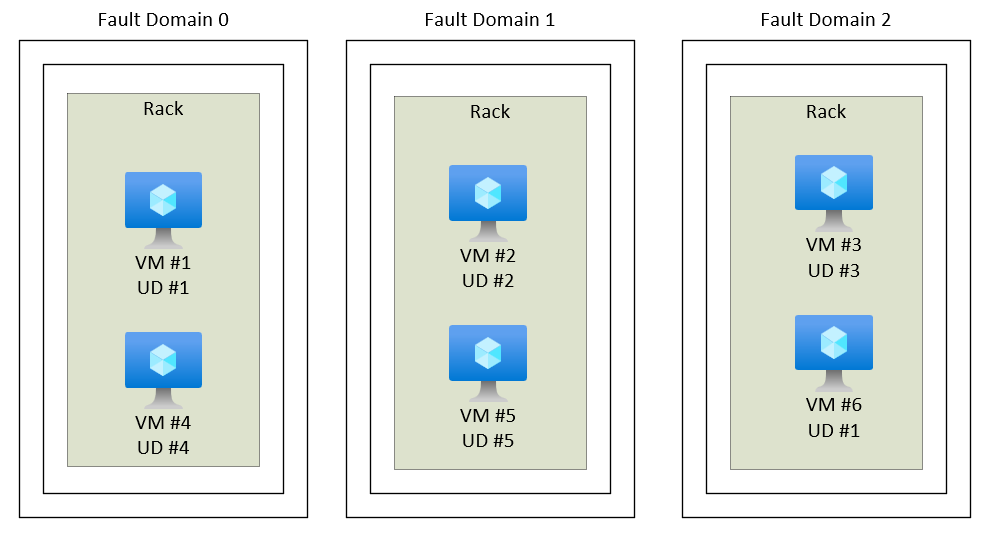
Diagrams courtesy of Microsoft Learn / Azure docs: virtual-machines/availability-set-overview
When to choose it
Choose an availability set for compatible VM workloads that need in-region fault and maintenance separation where zones are not the right or supported choice. For new high-availability VM workloads, evaluate a flexible scale set and availability zones as well. Confirm current SLA terms separately from the design pattern.
Related
azure-vm · availability-zones · virtual-machine-scale-set · load-balancer · northwind-traders-case-study
📘 Source: Microsoft Learn — Availability sets overview, checked 2026-09-16.