Azure managed disks
What it is
A managed disk is a block-level storage volume Azure manages for an Azure VM. It is the cloud equivalent of a server’s virtual hard drive. You choose its type and size; Azure manages the underlying storage infrastructure.
Why it exists
VMs need persistent boot and application-data storage without requiring the team to operate storage accounts for each virtual hard disk. Managed disks separate the VM’s compute lifetime from its persistent disks and provide several performance and resilience options.
Key ideas
- Disk types: Ultra Disk, Premium SSD v2, Premium SSD, Standard SSD, and Standard HDD offer different performance and cost characteristics. Choose based on measured workload needs, not the disk label alone.
- OS disk: every VM has one boot disk. Keep the operating system there; put application data on separate data disks when that improves recovery, maintenance, or performance isolation.
- Data disks: persistent managed disks attached to a VM for applications and data. The VM size constrains how many can attach and which types it supports.
- Temporary disk: most VMs also have local temporary storage, which is not a managed disk. It can lose data during maintenance, redeployment, or a stop operation; use it only for disposable items such as page files, swap, or
tempdbwhere appropriate. - Ephemeral OS disk: stores the OS on local VM storage for supported designs. It is useful for disposable, stateless fleets, but not for a VM whose OS state must survive host events.
- Snapshots and images: snapshots copy a disk at a point in time; generalized images are blueprints for creating VMs. Neither automatically replaces a tested backup plan.
- Resilience: managed disks offer locally redundant and zone-redundant options where supported. Storage redundancy protects disk copies, while application availability still requires an appropriate compute and recovery design.
Northwind example
Northwind runs its ordering application on a VM with one OS disk and separate data disks for application files. It uses temporary storage only for disposable cache. When Luis needs to test a risky disk change, Maya creates a snapshot and plans how to create a replacement disk if needed. For routine recovery, the team uses Azure Backup and verifies restores; a single ad-hoc snapshot is not its disaster-recovery plan.
How it fits (diagram)
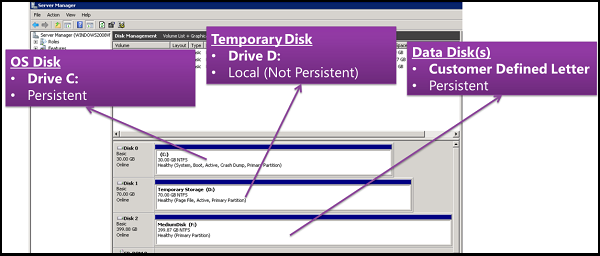
Diagrams courtesy of Microsoft Learn / Azure docs: virtual-machines/managed-disks-overview
Exam notes
- A snapshot copies one managed disk. It does not coordinate a multi-disk database or application by itself.
- Temporary and ephemeral storage are not a safe location for persistent business data.
- Managed-disk encryption options include server-side encryption, Azure Disk Encryption, and encryption at host; choose the control required by the design.
Related
Path MOC · azure-vm · vm-snapshot · availability-set · virtual-machine-scale-set