Storage redundancy & replication
What it is
Azure Storage redundancy keeps multiple infrastructure copies of data in a storage account. It helps the service survive hardware, datacenter, or regional failures, depending on the option. It is not a point-in-time backup: a deletion or corrupt change can be copied too.
Why it exists
Redundancy is a tradeoff between cost, in-region availability, and geographic recovery. Its behavior depends on the account type, Azure region, and service. Choose it before assuming a workload can survive a particular failure.
The options in plain language
| Option | Where Azure keeps copies | Main protection | Important limit |
|---|---|---|---|
| LRS (locally redundant) | One datacenter in the primary region | Drive, server, and rack failures | A datacenter-scale disaster can affect every copy. |
| ZRS (zone-redundant) | Three or more availability zones in the primary region | A single-zone failure | It remains a single-region design. |
| GRS (geo-redundant) | Primary region plus asynchronous copies in a secondary region | Regional recovery capability | Secondary data is not normally readable before failover. |
| GZRS (geo-zone-redundant) | ZRS in the primary region plus asynchronous secondary-region copies | Zone resilience plus regional recovery capability | Geographic replication is asynchronous. |
| RA-GRS / RA-GZRS | The corresponding geo-redundant design | The above, plus read access to the secondary endpoint | Read access does not make the secondary writable or make failover automatic. |
Azure Storage uses at least three copies for LRS and synchronous copying across zones for ZRS. GRS and GZRS replicate to the secondary region asynchronously, so recent writes can be absent during a regional recovery. Service support and change paths vary; verify them for the account type and region rather than treating this table as a migration guarantee.
How it fits (diagram)
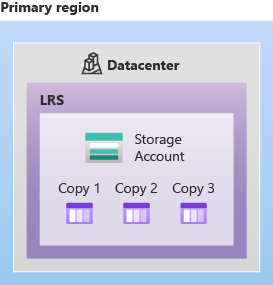
Diagrams courtesy of Microsoft Learn / Azure docs: storage/common/storage-redundancy
Northwind example
Northwind stores live order receipts in a zone-enabled region. It selects ZRS when keeping the service available through a single-zone failure matters and regional recovery is handled elsewhere. If its recovery design requires a second-region copy, it evaluates GZRS and a documented failover plan. For accidental deletion, it also enables appropriate data-protection features and tests restoration. ZRS and GZRS copy healthy or unhealthy changes; neither is a substitute for backup.
Common confusion
- Zone-redundant means copies across zones in one region; geo-redundant means copies in a second region. They solve different failure scopes.
- Durability (“copies are unlikely to be lost”) is different from availability (“clients can reach the data now”).
- RA means read access to the secondary endpoint. It is not a second writable production account.
- Choosing a region pair does not enable GRS or GZRS. The storage-account redundancy setting does.
Related
storage-account · storage-performance · blob-storage · azure-files · availability-zones · zone-redundant · azure-backup · northwind-traders-case-study
📘 Source: Microsoft Learn — Azure Storage redundancy, checked 2026-09-16.