Azure Backup
What it is
Azure Backup is Azure’s managed data-protection service. It captures recovery points for supported workloads and lets you restore data, a disk, files, a database, or a fuller workload version when something is deleted, corrupted, or otherwise needs to be recovered. It uses policy-driven schedules and retention rather than asking a person to copy data manually.
Why it exists
Data loss protection for accidental deletion, corruption, or ransomware: you need reliable, retention-controlled, point-in-time copies you can restore on demand. Azure Backup provides managed, encrypted, off-server copies with a simple policy model — instead of scripting your own snapshot jobs.
Key ideas
- A backup policy defines the schedule, frequency, and retention. A recovery point is a recoverable point in time, not an always-running replica.
- Supported workloads and restoration options vary. Azure Backup can protect VMs, disks, databases, Azure Files, blobs, selected container workloads, and supported on-premises workloads, but verify the required workload and target-vault support.
- Azure Backup can use snapshots, vaulted copies, or both, depending on the workload. A snapshot can enable fast restore; a vault copy provides a separate recovery layer and retention.
- Recovery objectives matter: RPO is the amount of recent data the business can lose; RTO is how long recovery may take. A daily backup cannot meet a one-hour data-loss objective.
Northwind example
Northwind backs up the VM hosting a legacy warehouse connector with a policy that matches the acceptable RPO and retention requirement. After a faulty update corrupts the connector, Luis restores a tested recovery point to a safe target and validates it before returning it to service. The backup helps recover the data and VM state; it does not keep a second live application serving customers during a regional outage.
Common confusion
- Site Recovery replicates workloads and orchestrates failover for disaster recovery; Azure Backup protects recoverable copies of data.
- Storage redundancy makes infrastructure copies; backup preserves recovery points. Both can be needed.
- A configured backup is not proof of recovery. Test restores, document owners, and protect the vault from accidental or malicious deletion.
How it fits (diagram)
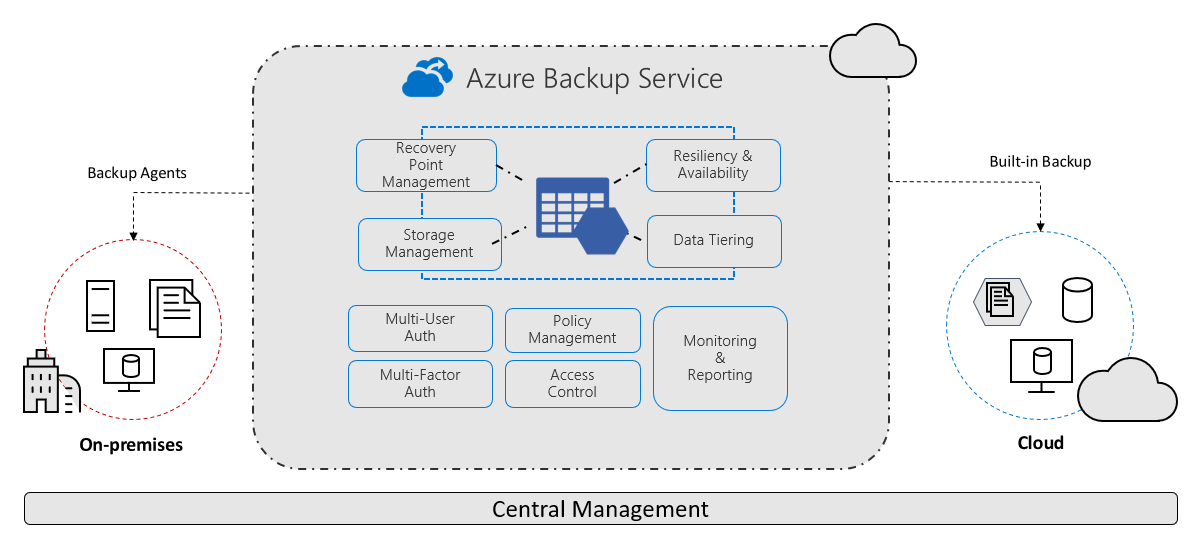
Diagrams courtesy of Microsoft Learn / Azure docs: backup/backup-overview
Plan a restore
Identify the workload, acceptable RPO and RTO, recovery target, policy, retention, vault type, access controls, and test schedule. Monitor backup jobs and investigate failures before an incident makes the gap visible.
Related
recovery-services-vault · backup-vault · azure-backup-policy · azure-site-recovery · azure-vm · redundancy-lrs-zrs-grs · northwind-traders-case-study
📘 Source: Microsoft Learn — What is Azure Backup?, checked 2026-09-16.