Azure Resource Manager (ARM)
What it is
Azure Resource Manager (ARM) is Azure’s deployment and management layer, also called the control plane. When you use the portal, Azure CLI, PowerShell, an SDK, Bicep, or an ARM template to manage supported Azure resources, the request goes through ARM to the appropriate Azure resource provider.
Why it exists
Without a single control plane, each tool would talk to each resource type in a different, inconsistent way. ARM gives Azure a consistent, centralized API for management and enforces authentication + authorization (RBAC) on every request, plus declarative deployment so you can describe the end-state instead of the step-by-step commands.
Control plane versus data plane
The control plane changes the resource itself: create a storage account, set a tag, configure a network, or assign a role. ARM handles those management operations. The data plane works with the service’s contents: read a blob, send a queue message, or connect to a VM’s operating system. Data-plane access goes to the service endpoint and often needs its own permission or authentication method.
For example, someone might have permission to create a storage account through ARM but lack the data-plane role needed to read files in it. “I can see the resource in the portal” does not prove “I can read its data.”
How it works
- ARM authenticates and authorizes management requests, then passes them to a resource provider such as
Microsoft.Compute,Microsoft.Network, orMicrosoft.Storage. - A declarative ARM template or Bicep file states the intended resources and settings. ARM works out dependencies and applies the deployment.
- The portal, CLI, PowerShell, REST API, and SDKs are different ways to send management requests; they are not separate Azure environments.
Northwind example
Northwind uses Bicep to describe its ordering web app, storage account, and monitoring. Luis sends that deployment through ARM. ARM checks his RBAC access and applicable Policy before a resource provider creates or updates the resources. Later, the web app reads an order file from storage through the storage data plane; that access needs a suitable data permission too.
Common confusion
- ARM is not the application runtime and does not carry ordinary customer web traffic to Northwind’s site.
- ARM templates and Bicep manage infrastructure. They do not replace application source code or a data-backup plan.
- Resource providers expose Azure resource types. Registering or using a provider is not the same as assigning a person permission to manage its resources.
How it fits (diagram)
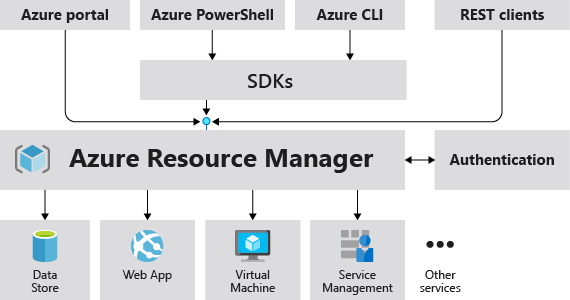
Diagrams courtesy of Microsoft Learn / Azure docs: azure-resource-manager/management/overview
Exam notes
- ARM = control plane; the resource = data plane. Know which operations hit which.
- RBAC is enforced by ARM at request time — an allowed caller still needs data-plane permissions for the data inside the resource.
- Templates let ARM deploy declaratively, idempotently, and in dependency order.
- Resource providers must be registered for the subscription before some resource types can be created.
Related
azure-management-hierarchy · arm-template · bicep · resource-group · scope · rbac · azure-policy · azure-cli · northwind-traders-case-study
📘 Source: Microsoft Learn — What is Azure Resource Manager?, checked 2026-09-16.