Role-Based Access Control (RBAC)
What it is
Azure role-based access control (RBAC) is Azure’s authorization system. It answers three questions: who is asking, what are they allowed to do, and where does that permission apply? It can decide, for example, whether Luis may restart a VM, create a resource, or read blobs at a particular scope.
Why it exists
To enforce the least-privilege principle at scale: give each user/service exactly the permissions they need, no more, and manage that centrally rather than per-resource.
The three pieces
- A security principal is the identity requesting access: a user, group, service principal, or managed identity.
- A role definition is the permission set, such as Reader, Contributor, or a data-specific role like Storage Blob Data Reader.
- A scope is where the role applies: management group, subscription, resource group, or resource.
security principal + role + scope = assignment
Northwind example
Northwind puts Luis in an Entra group called Orders deployers. Maya assigns that group the Contributor role at the orders-production resource group. The group is the principal, Contributor is the role, and orders-production is the scope. Luis can manage that ordering workload, but the assignment does not grant him access to another resource group or subscription unless another role assignment does.
If Maya instead assigned the role to the production subscription, it would reach every resource group below it. The permission word “Contributor” has not changed; the scope has made it much broader.
Identity versus RBAC
Microsoft Entra ID authenticates an identity: “this is Luis.” RBAC authorizes a known identity: “Luis may manage this resource group.” Authentication alone does not create Azure-resource permission.
How access is evaluated
RBAC role assignments are additive. Azure considers the assignments for the principal and its groups at the resource and its parent scopes. A narrower allow does not cancel a broader allow. Applicable deny assignments can block access, and role-assignment conditions can impose extra requirements. This is why checking just one assignment or a person’s job title is not enough to diagnose access.
Prefer group-based assignments and built-in roles where they fit. Use a custom role only when its precise permissions are required and can be maintained safely. Grant the narrowest scope that lets someone complete their work.
Common confusion
- Reader can view management information but does not automatically read the data inside every service. Data-plane access may require a service-specific data role.
- Contributor can manage many resources but cannot assign Azure roles by default. Do not treat it as Owner.
- Azure Policy governs what a resource configuration may look like; RBAC governs who may perform an action. A user can have RBAC permission to create a VM and still be stopped by a policy that denies its region or SKU.
Diagram
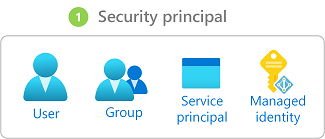
Diagrams courtesy of Microsoft Learn / Azure docs: role-based-access-control/overview
Related
entraid · role-definition · role-assignment · scope · subscription · resource-group · azure-policy · northwind-traders-case-study
📘 Source: Microsoft Learn — Azure RBAC, checked 2026-09-16. Re-audit when role-assignment evaluation or built-in role behavior changes.