Management groups
What it is
Management groups are containers above Azure subscriptions. They form a tree in which governance settings can flow down to child management groups, subscriptions, resource groups, and resources. They organize the management of subscriptions; they do not hold an application’s VMs or data.
Think of a management group as a company policy folder, not a project folder. A rule placed in a parent folder reaches every eligible item in its child folders.
Why it exists
A large organization may have subscriptions for production, testing, shared networking, and different business units. Repeating the same safety rule in each subscription is slow and easy to get wrong. A management group gives a shared governance scope above them.
How the hierarchy works
Every Microsoft Entra directory has one built-in top-level root management group. All management groups and subscriptions in that directory fold into its one hierarchy. A management group or subscription can have one parent, while a management group can have many children. The tree can have up to six management-group levels below the root (the root and subscription levels do not count).
The main inheritance rule is simple: a policy assignment or Azure RBAC role assignment at a management-group scope applies to the scopes below it. This makes the chosen level powerful. A broad role assignment can grant access across many subscriptions; a broad policy can constrain every descendant resource.
Northwind example
Northwind has a root management group and creates two child groups:
Tenant root group
└── Northwind
    ├── Production
    │   └── northwind-production subscription
    └── Sandbox
        └── northwind-lab subscription
Maya assigns a policy to Production that allows only Northwind’s approved deployment regions. The policy reaches the production subscription, its resource groups, and its resources. She does not assign it to Sandbox, where Luis needs room to learn. Priya can inspect production costs in the production subscription; moving the subscription under a different management group would change which inherited policies and roles apply, but would not move its resources to a different region.
Choose the right boundary
| Need | Prefer | Why |
|---|---|---|
| One rule for several subscriptions with the same compliance need | Management group | Assign once and inherit down. |
| Separate invoice, quota, or strong environment isolation | subscription | A subscription is a billing, quota, and access boundary. |
| Deploy and retire one application’s components together | resource-group | A resource group is a lifecycle container. |
| Label resources for search or cost reporting | [[resource-tags | Tags]] |
Guardrails and failure modes
- Keep the tree shallow and organize it around shared governance needs, not a copy of every department chart. Deep trees make inherited settings hard to diagnose.
- Be especially cautious at the root. A policy or role there applies across the directory hierarchy. Microsoft recommends placing only must-have assignments there.
- All subscriptions in one management-group hierarchy trust the same Microsoft Entra tenant. A management group does not join unrelated tenants.
- A management group is not a billing account or a resource group. It can help govern costs, but billing capabilities depend on the subscription agreement and service.
How it fits (diagram)
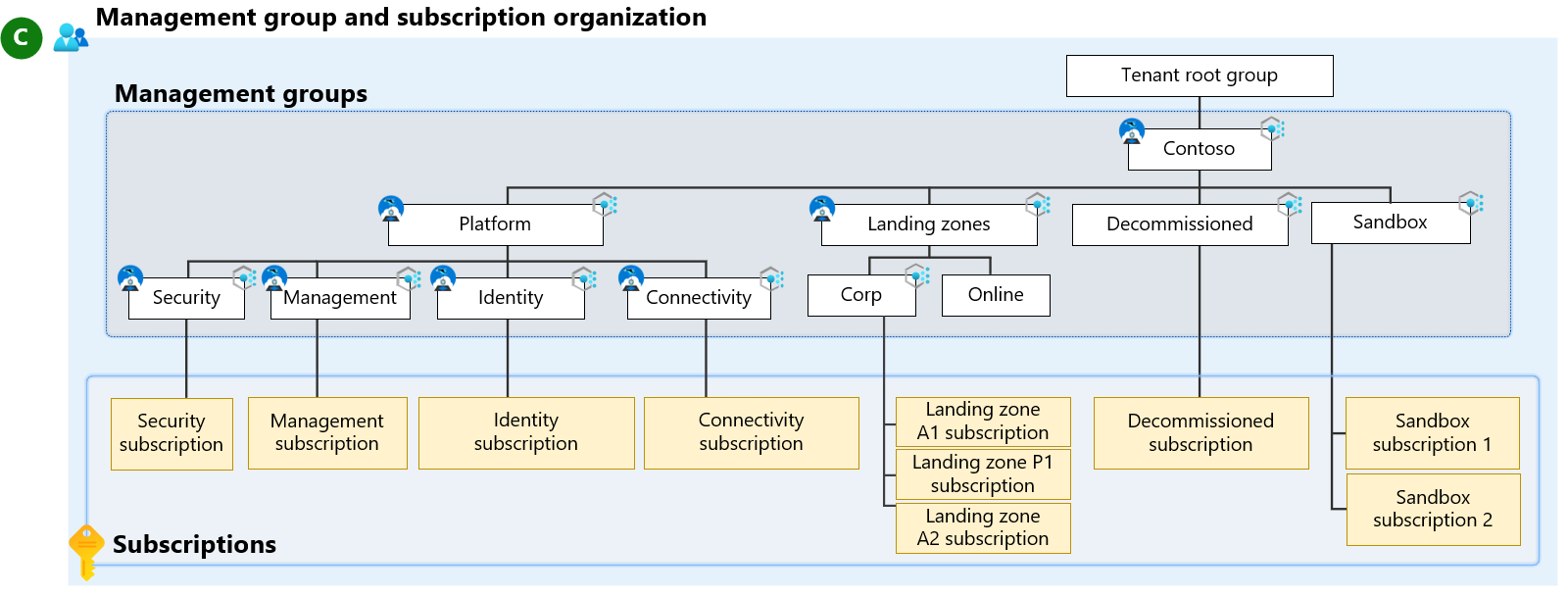
Diagrams courtesy of Microsoft Learn / Azure docs: governance/management-groups/overview
Where it appears in the route
Read azure-management-hierarchy first, then practise inheritance in AZ-104 foundation.
Related
azure-management-hierarchy · subscription · resource-group · scope · azure-policy · rbac · northwind-traders-case-study
Sources and re-audit
- Microsoft Learn — What are Azure management groups?, checked 2026-09-16.
- Microsoft Cloud Adoption Framework — Management groups, checked 2026-09-16.