Identity and authorization boundary

The request sequence

Authentication establishes which principal is acting. Microsoft Entra ID issues or validates the identity token. Authorization then checks what that principal may do: an Azure RBAC role assignment grants an action at a scope such as a subscription, resource group, or resource. The service finally evaluates its data-plane permission when the request reads or changes data.

Authentication is therefore not authorization. A valid sign-in can still receive 403 Forbidden because it lacks the required role; a role assignment cannot repair a missing, expired, or incorrectly targeted token.

Microsoft Entra roles authorize directory operations such as managing users or app registrations. Azure RBAC roles authorize Azure resource operations. They may name similar actions but apply in different planes. A service principal is an application identity whose credential lifecycle is owned by the application team. A managed identity is an Azure-managed service principal attached to a resource. Workload identity federation lets an external workload exchange a trusted token without storing a long-lived client secret. A service account is a generic term for a non-human identity; it is not automatically a service principal or a managed identity.

Scope, tenant, and pipeline boundaries

A tenant contains directory identities. A subscription trusts a tenant and contains resources, billing, and quota boundaries. A role assignment binds principal + role + scope. The assignment inherits downward where the authorization system supports inheritance, so a role at a resource group can affect its resources but does not grant control over a sibling group.

An Azure DevOps or GitHub service connection is a delivery-system credential/configuration that authenticates a pipeline to a target. It is not an Azure service endpoint, which is a networking path/control, and it is not a private endpoint, which gives a supported service a private address in a VNet. Confusing these boundaries can produce a pipeline that authenticates successfully but cannot reach or authorize the target resource.

Worked failure diagnosis

If a pipeline receives a token but deployment is denied, inspect the service connection’s identity, its Azure RBAC role, the assignment scope, and any Policy denial. If a storage read is denied after RBAC succeeds, inspect the storage data-plane authorization and network firewall. If a user can manage an app registration but cannot resize a VM, the user may have an Entra directory role without the needed Azure RBAC role.

Route and sources

Learn the identity vocabulary in AZ-900 identity and governance, apply scope in AZ-104 identity, use workload identities in the retired AZ-204 security foundation, and connect pipeline authentication in AZ-400 secure delivery.

Re-audit when Entra token, Azure RBAC, managed identity, federation, or pipeline service-connection behavior changes.

entraid · azure-ad-roles · rbac · role-assignment · scope · tenant · subscription · service-principal · managed-identity · service-connection · service-endpoint · private-endpoint

Microsoft Entra tenant

What it is

A Microsoft Entra tenant is an organization’s dedicated identity directory in Microsoft Entra ID. It contains identities and directory settings, including users, groups, applications, and devices. Think of it as Northwind’s sign-in directory, not as the folder that holds its Azure servers or invoices.

Why it exists

Because Azure is shared infrastructure, each org needs an isolated directory where its identities live and are managed. The tenant defines the trust and isolation boundary — identities, data and settings in one tenant are isolated from others.

How it relates to Azure

  • Each Azure subscription trusts one Entra tenant at a time. The tenant supplies the identities; Azure RBAC assignments decide what those identities may do in the subscription.
  • One tenant can be associated with many subscriptions and one management-group hierarchy.
  • Tenants are isolated by default, but organizations can configure collaboration and cross-tenant access. That does not merge their directories into one tenant.

Northwind example

Maya creates users for Luis and Priya, an Orders deployers group, and an application identity in Northwind’s tenant. The production subscription trusts that tenant. A role assignment then lets the deployers group manage only the ordering resource group. The tenant proves and manages identities; the subscription holds the resources and billing boundary.

Common confusion

  • A tenant is not a subscription, management group, resource group, Azure region, or DNS domain for an application.
  • Signing in successfully proves identity; it does not by itself grant Azure-resource access.
  • “Azure AD” is the former name for Microsoft Entra ID. Older documentation and exam material may use either name.

How it fits (diagram)

Where it appears in the route

Use this entry with entraid, rbac, and azure-management-hierarchy before configuring people or workload identities.

entraid · subscription · user-account · management-groups · rbac · northwind-traders-case-study

📘 Source: Microsoft Learn — What is Microsoft Entra ID?, checked 2026-09-16.

Microsoft Entra ID (formerly Azure Active Directory)

What it is

Microsoft Entra ID is Microsoft’s cloud-based identity and access-management service. It stores identities such as people, groups, devices, and applications; verifies a sign-in (authentication, “who are you?”); and can enforce sign-in policies. It was formerly called Azure Active Directory (Azure AD).

Why it exists

An organization needs one place to recognize its people and workloads across Azure, Microsoft 365, and connected apps—without running cloud domain controllers. An Entra tenant is that organization’s isolated directory.

Key ideas

  • Tenant: the isolated Entra directory for an organization. An Azure subscription trusts one tenant for identity.
  • Directory objects: users, groups, devices, applications, service principals, and managed identities.
  • Single sign-on (SSO): after a successful Entra sign-in, connected applications can reuse that identity experience instead of each asking for a separate password.
  • Policy is contextual: Conditional Access can require controls such as MFA based on the sign-in and policy conditions.
  • Not a domain controller: Entra ID can join and manage modern devices, but it is not Windows Server AD DS. A legacy workload needing LDAP, Kerberos/NTLM, or Group Policy needs AD DS-compatible services.

Components relevant to AZ-104

Relationship to RBAC

Azure RBAC authorizes access to Azure resources. Entra ID supplies the identity RBAC evaluates. Entra also has directory roles for managing Entra objects. In short: Entra helps establish who or what is asking; the assigned role and scope decide what that identity may do.

Northwind example

Maya creates an Entra group named Northwind-Platform-Admins, then assigns that group an Azure role at the appropriate scope. When Luis joins the platform team, Maya adds him to the group instead of making several separate role assignments. A Conditional Access policy asks Luis for MFA when its conditions require it. The group is not the resource permission by itself—it is a convenient way to give the same assignment to the right people.

Diagram

entraid - Microsoft diagram

Diagrams courtesy of Microsoft Learn / Azure docs: entra/identity/entra-overview

Exam notes

  • Entra ID = cloud identity, authentication, and policy layer. Azure RBAC = Azure-resource authorization layer.
  • Rebranded from Azure AD in 2023; the exam may still reference “Azure AD” — same thing.
  • A tenant = the container for identities; a subscription = a container for resources that trusts a tenant.

rbac · user-account · service-principal · mfa · conditional-access · tenant

📘 Sources: Microsoft Learn — What is Microsoft Entra? and Azure AD naming change.

Service principal (app identity)

What it is

A service principal is the Microsoft Entra identity that represents an application, automation process, or service inside a tenant. It lets a non-human workload sign in and then receive permissions. Think of it as Northwind’s employee badge for software, not an extra human account.

Why it exists

Apps and automation need to authenticate and be authorized without human credentials. A service principal can use a certificate, client secret, or federated credential; CI/CD (Pipelines/github-actions), scripts, and services then receive only the RBAC access they need.

Key ideas

  • An application object describes an application. A service principal is that application’s local identity representation in a tenant. An application can have service principals in multiple tenants.
  • A service principal can authenticate using a certificate, a client secret, or a federated credential. Credentials are sensitive; prefer a managed identity for supported Azure-hosted workloads, or federation for supported external automation.
  • Authentication proves the software’s identity. RBAC or a service’s own authorization then grants the minimum access it needs.
  • A managed identity has a backing service principal, but Azure manages its credentials and lifecycle differently from an application registration.

Northwind example

Northwind’s deployment system needs permission to deploy the ordering application. It uses a service principal with a federated credential rather than saving a long-lived client secret in the pipeline. Maya grants that identity only the deployment permissions it needs at the production resource-group scope. The pipeline can authenticate as its service principal, but it cannot read order receipts unless a separate data permission is granted.

Common confusion

  • A service principal is not automatically an administrator. It has no useful Azure access until a role assignment or service-specific authorization grants it.
  • A client secret is a credential for a service principal, not the service principal itself.
  • Do not use a shared human user account as an application’s identity. It obscures accountability and makes rotation/offboarding unsafe.

How it fits (diagram)

service-principal - Microsoft diagram

Diagrams courtesy of Microsoft Learn / Azure docs: entra/identity-platform/app-objects-and-service-principals

Exam notes

  • Managed identities are the recommended way to give Azure workloads access to Azure resources.
  • System-assigned (tied to one resource) vs user-assigned (shared across resources) — know the difference.
  • Service principals need the right role (e.g. Contributor, or a custom role) — least privilege.

entraid · rbac · user-account · managed-identity · key-vault · azure-pipelines · northwind-traders-case-study

📘 Source: Microsoft Learn — Application and service principal objects, checked 2026-09-16. Re-audit when service-principal, managed-identity, or workload-federation behavior changes.

Scope

What it is

Scope is the part of Azure to which a setting applies. For Azure RBAC, the management scope hierarchy is:

Management group → Subscription → Resource group → Resource

The higher the scope, the wider the effect. Scope lets Maya give Luis permission only for Northwind’s ordering resource group instead of every subscription, while still letting an organization apply a required policy to several subscriptions at once.

How it works

  • An Azure RBAC role assignment at a higher scope, such as a subscription, is inherited by lower scopes. A narrower allow assignment adds permission; it does not remove a broader allow.
  • An Azure Policy assignment at a management group affects descendant subscriptions and their resources, subject to its configuration and exclusions.
  • Effective access is the combined set of applicable role assignments, constrained by applicable deny assignments. “More specific” does not automatically beat “broader.”

Northwind example

Maya assigns Luis Contributor at the orders-production resource group. He can manage that workload but not Northwind’s unrelated finance resources. If Maya instead assigned the same role at northwind-production subscription scope, Luis would inherit it for every resource group in that subscription. If she assigned it at the Production management group, he could inherit access into every descendant production subscription. The permission name is unchanged; the scope changes its reach.

Common confusion

  • Scope answers “where does this setting apply?”, not “who is the person?” The identity is the principal; the role assignment connects the principal, role, and scope.
  • The Microsoft Entra tenant is an identity boundary. The four usual Azure management scopes are management group, subscription, resource group, and resource.
  • Azure Policy, RBAC, locks, and tags all use scopes, but they have different behavior. Do not assume a tag or an RBAC assignment can do what a Policy assignment does.

How it fits (diagram)

Practical rule

Grant access at the narrowest scope that lets the person do their work. Apply broad organization-wide governance only where the rule truly must cover every descendant. Then test the effective access and policy result rather than inferring it from a resource’s name or folder-like appearance.

azure-management-hierarchy · management-groups · subscription · resource-group · role-assignment · azure-policy · northwind-traders-case-study

📘 Source: Microsoft Learn — Understand scope for Azure RBAC, checked 2026-09-16.

Role-Based Access Control (RBAC)

What it is

Azure role-based access control (RBAC) is Azure’s authorization system. It answers three questions: who is asking, what are they allowed to do, and where does that permission apply? It can decide, for example, whether Luis may restart a VM, create a resource, or read blobs at a particular scope.

Why it exists

To enforce the least-privilege principle at scale: give each user/service exactly the permissions they need, no more, and manage that centrally rather than per-resource.

The three pieces

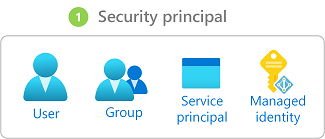
  1. A security principal is the identity requesting access: a user, group, service principal, or managed identity.
  2. A role definition is the permission set, such as Reader, Contributor, or a data-specific role like Storage Blob Data Reader.
  3. A scope is where the role applies: management group, subscription, resource group, or resource.

security principal + role + scope = assignment

Northwind example

Northwind puts Luis in an Entra group called Orders deployers. Maya assigns that group the Contributor role at the orders-production resource group. The group is the principal, Contributor is the role, and orders-production is the scope. Luis can manage that ordering workload, but the assignment does not grant him access to another resource group or subscription unless another role assignment does.

If Maya instead assigned the role to the production subscription, it would reach every resource group below it. The permission word “Contributor” has not changed; the scope has made it much broader.

Identity versus RBAC

Microsoft Entra ID authenticates an identity: “this is Luis.” RBAC authorizes a known identity: “Luis may manage this resource group.” Authentication alone does not create Azure-resource permission.

How access is evaluated

RBAC role assignments are additive. Azure considers the assignments for the principal and its groups at the resource and its parent scopes. A narrower allow does not cancel a broader allow. Applicable deny assignments can block access, and role-assignment conditions can impose extra requirements. This is why checking just one assignment or a person’s job title is not enough to diagnose access.

Prefer group-based assignments and built-in roles where they fit. Use a custom role only when its precise permissions are required and can be maintained safely. Grant the narrowest scope that lets someone complete their work.

Common confusion

  • Reader can view management information but does not automatically read the data inside every service. Data-plane access may require a service-specific data role.
  • Contributor can manage many resources but cannot assign Azure roles by default. Do not treat it as Owner.
  • Azure Policy governs what a resource configuration may look like; RBAC governs who may perform an action. A user can have RBAC permission to create a VM and still be stopped by a policy that denies its region or SKU.

Diagram
rbac - Microsoft diagram

Diagrams courtesy of Microsoft Learn / Azure docs: role-based-access-control/overview

entraid · role-definition · role-assignment · scope · subscription · resource-group · azure-policy · northwind-traders-case-study

📘 Source: Microsoft Learn — Azure RBAC, checked 2026-09-16. Re-audit when role-assignment evaluation or built-in role behavior changes.

Role assignment (RBAC)

What it is

A role assignment is the record that joins three Azure RBAC elements:

Security principal (who) + role definition (what they can do) + scope (where) = an assignment.

A role definition by itself grants nobody anything. The assignment is the answer to “who has which permissions, at which Azure scope?”

Why it exists

Access is a relationship, not a property. Assignments make “who can do what, where” explicit, auditable, and scoped, which is how least-privilege gets implemented and governed.

Key ideas

  • Principal: a user, group, service principal, or managed identity that receives the role.
  • Scope: management group → subscription → resource group → resource. An assignment inherits to child scopes, so a subscription-level role can be very broad.
  • Least privilege: prefer a well-managed group and the highest scope that is still narrow enough for the job. “Highest” does not mean “subscription” by default.
  • Who can create it: the person or automation needs permission for Microsoft.Authorization/roleAssignments/write at the target scope. Common built-in ways to receive that permission include Owner or User Access Administrator; Contributor does not receive it by default.

Northwind example

Maya assigns the Reader role to Northwind-Auditors at one production resource group. Every member can see resources in that group and its children, but not modify them or see unrelated subscriptions. Assigning the same group at the subscription scope would widen access to all resource groups below it, so she avoids it unless that is the intended responsibility.

How it fits (diagram)

Exam notes

  • Know the scope hierarchy and inheritance.
  • A role assignment is not a login account, and it does not replace a Conditional Access policy.

rbac · role-definition · scope · groups · service-principal

📘 Source: Microsoft Learn — Assign Azure roles using the Azure portal

Service connection

What it is

An Azure DevOps service connection is a named connection configuration that lets a pipeline authenticate to an external service, such as an Azure subscription or container registry. It links the target service with an authentication method and Azure DevOps permissions; it is not itself the Azure identity or the network path.

Why it exists

Pipeline YAML should describe work, not contain reusable cloud credentials. A service connection keeps the target and authentication configuration outside the YAML and can apply permissions and checks to its use. The underlying identity still needs least-privilege permission at the target Azure scope.

Not the same as

  • service-endpoint — an Azure networking feature that keeps a PaaS service’s public endpoint but limits access from selected VNets. It does not authenticate a pipeline.
  • private-endpoint — a private network interface for a PaaS service. It does not grant a pipeline permission.
  • service-account — the underlying non-human identity. A service connection can use a service principal or workload identity federation, but it is the pipeline integration object, not the identity itself.
  • subscription-connection — the previous vault name for the Azure subscription form of this concept. Use this page as the canonical cross-platform explanation.

Operational failure mode

A pipeline can be valid YAML yet fail at deployment because the service connection lacks RBAC at the target scope, is not authorized for that pipeline, or cannot obtain a token. Diagnose identity, target scope, connection authorization, and network reachability separately.

Northwind example

Northwind creates an Azure Resource Manager service connection named orders-prod. It uses workload identity federation, so the pipeline does not store an Azure client secret. The service principal receives only the deployment role required for the production order resource group, not Contributor on the whole subscription. A pipeline can reference orders-prod, but Azure DevOps checks whether the pipeline is authorized to use that connection; Azure RBAC separately decides whether its underlying identity can deploy the requested resource.

Choose the identity path

  • Prefer workload identity federation for Azure Pipelines deployments that can use short-lived tokens.
  • Use a managed identity when an Azure-hosted workload accesses Azure services directly.
  • Use a stored secret only when the target cannot support a safer identity flow, then protect and rotate it deliberately.

subscription-connection · service-principal · managed-identity · workload-identity-federation · pipeline-security

📘 Source: Microsoft Learn — Resource Manager workload identity service connection

Azure Private Endpoint

What it is

A private endpoint is a network interface with a private IP address from your VNet. It gives clients in that network a private path to a supported Azure service or Private Link service. In plain language, it places a private “door” to a specific service instance inside your network; it does not move the entire service into your subnet.

Why it exists

It lets a workload reach a PaaS service such as Storage or Key Vault through a private address rather than the service’s public endpoint. This reduces public exposure and gives the destination a VNet-local path.

Key ideas

  • The endpoint uses a private IP from a subnet. The target remains a separate Azure service resource; clients initiate connections to the endpoint.
  • DNS is essential. Clients must resolve the target service name to the private endpoint’s IP, commonly using a private DNS zone. A private endpoint with incorrect DNS often looks like a connectivity failure.
  • Connection approval can be automatic or manual, depending on permissions and the target. Only an approved connection can carry traffic.
  • After testing private connectivity, a service can often disable public network access where its supported configuration allows it. This is a deliberate target-service decision, not an automatic effect of creating the endpoint.

Northwind example

Northwind gives its ordering app private access to one production storage account through a private endpoint in the private-endpoints subnet. Private DNS makes the usual storage hostname resolve to the endpoint’s private address for Northwind’s network. The app still uses its managed identity and data permissions to read the receipt—it has a private network path, not automatic data authorization. Once the path is tested, Northwind disables the storage account’s public access according to its requirements.

Private Endpoint versus service endpoint

NeedPreferWhy
A private IP in your VNet for one supported service instancePrivate EndpointPrivate Link creates the private network interface.
Secure a supported Azure service to traffic identified as coming from a VNet[[service-endpointService endpoint]]
Control source or destination traffic at addresses and ports[[nsgNSG]]

Common confusion

  • A private endpoint is not a VPN, a public IP, or a generic outbound proxy.
  • Private networking does not grant a caller access to the service data. Identity and authorization still apply.
  • A private endpoint is scoped to its target connection; it is not a blanket “make all Azure services private” switch.

Diagnose in order

Confirm the endpoint connection is approved, DNS resolves to the expected private address, a client has a route to it, network controls permit traffic, and the service permits the request. Then check the caller’s data-plane authorization.

service-endpoint · private-dns · storage-network-rule · vnet · subnet · nsg · managed-identity · northwind-traders-case-study

Source: Microsoft Learn — What is a private endpoint?, checked 2026-09-16.

Azure subscription

What it is

An Azure subscription is a logical container and a billing, quota, and access boundary for Azure resources. Most application resources are deployed in one subscription, and an organization can use many subscriptions. A few Azure resource types live at a management-group or tenant scope, so “every Azure object is in a subscription” is a useful beginner model, not an absolute rule.

Why it exists

When you sign up for Azure you consent to a subscription and pay for the resources inside it. Subscriptions give you a way to separate environments, teams, and cost so you can govern, bill, and limit each one independently while all of it is administered centrally.

How it works

  • Billing and quotas: usage is charged to a subscription, and service limits can be applied per subscription. A subscription is not a credit card, nor is it a geographic location.
  • Identity and access: a subscription trusts one Microsoft Entra tenant. The tenant contains identities; Azure RBAC determines what those identities can do in the subscription.
  • Organization: Management groups organize subscriptions and can pass policy or RBAC assignments down to them. A subscription contains resource groups and resources.
  • Separation: use separate subscriptions when an environment, owner, billing, quota, or compliance boundary must be genuinely separate. A naming convention alone does not create that boundary.

Northwind example

Northwind uses northwind-production for real orders and northwind-lab for experiments. Priya can report production costs separately, Maya can apply stricter production policy, and an accidental lab deployment does not consume the production subscription’s budget or quota. Luis may still have access to both, but only through explicit or inherited RBAC assignments.

Common confusion

  • A subscription is not the same as a tenant: the tenant provides the directory of identities, while the subscription provides the resource and billing boundary.
  • A subscription is not a resource group: a subscription can contain many resource groups with independent lifecycles.
  • Moving a subscription under another management group changes inherited governance. It does not itself move workloads or change their Azure region.

How it fits (diagram)

Failure modes and tradeoffs

  • Too few subscriptions can mix sensitive production access, costs, and quotas with experiments.
  • Too many subscriptions can make policy, networking, billing, and operations harder to coordinate.
  • Subscription transfer and resource moves have service-specific requirements. Confirm those requirements before designing a move as a recovery plan.

azure-management-hierarchy · management-groups · resource-group · scope · entraid · cost-management · northwind-traders-case-study

📘 Sources: Microsoft Learn — Azure Resource Manager overview and Subscription, checked 2026-09-16. Re-audit when subscription administration or billing ownership changes.

contains identitiesauthenticates asis granted throughbinds a role inauthorizes atcontainsauthenticates pipeline asdeploys toroutes privately toexplainsdistinguishes