Azure Monitor Activity Log
What it is
The activity log (formerly audit log) is a subscription-level, control-plane log that records management events — everything that created, modified, or deleted a resource and who did it. It answers “who changed this VM and when?” It covers the management/control plane, not the data inside a VM.
Why it exists
You need auditability and accountability: to know who created a resource, who resized it, who deleted a storage account, and who assigned an RBAC role. The activity log gives a tamper-resistant record of management operations.
Key ideas
- Per-operation entries include: caller identity, which operation ran (e.g.
Microsoft.Compute/virtualMachines/write), resource, timestamp, correlation ID, and the result/status. - Categories/levels: Administrative (write/delete/action), Service Health, Alert, Autoscale, Security (Defender), Resource Health, Policy, Recommendation.
- Retained 90 days by default; for longer, route to a Log Analytics workspace (or storage/event hub).
- Can trigger activity-log alerts and feed action groups (e.g. alert when a VM is deleted).
- View in Azure portal → Monitor → Activity log; query with the activity-log or via KQL once exported.
How it fits (diagram)
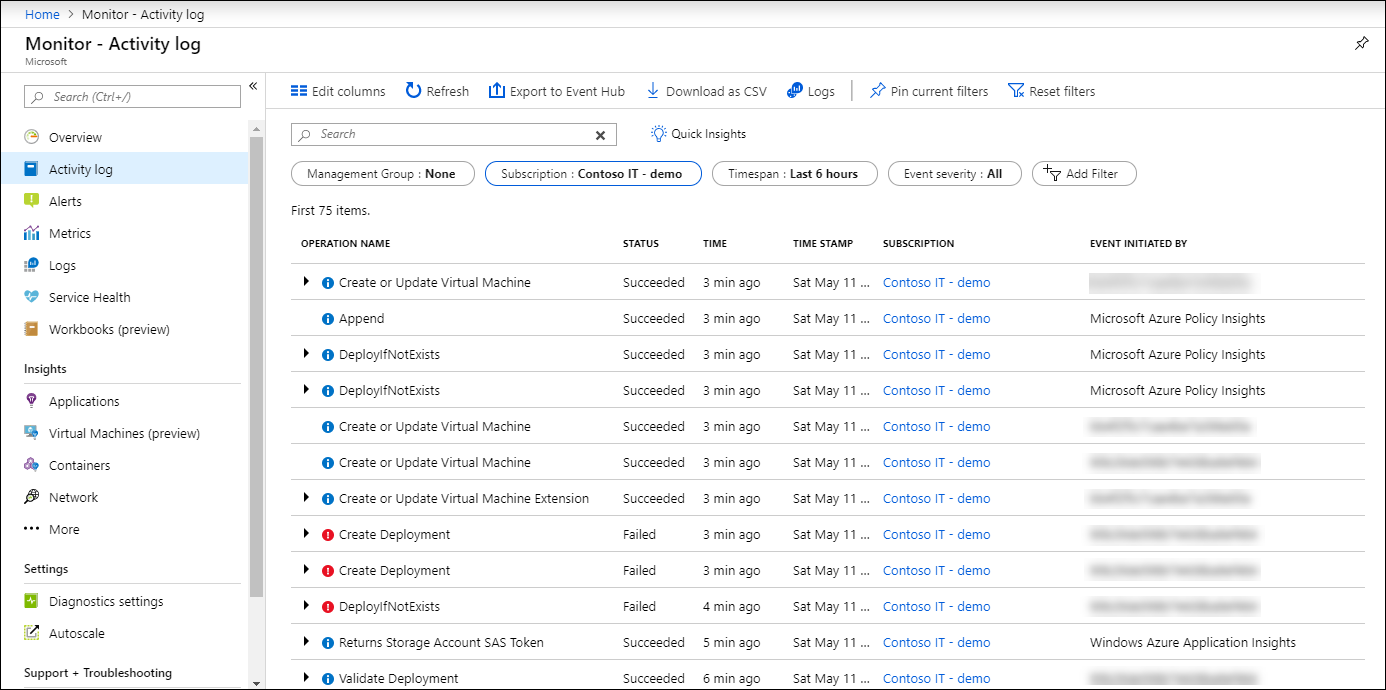
Diagrams courtesy of Microsoft Learn / Azure docs: azure-monitor/essentials/activity-log-insights
Exam notes
- Activity log = control plane / management events only — NOT guest OS or app data.
- It is subscription-scoped: one activity log per subscription, all resources.
- 90-day default retention; export to Log Analytics/logging for compliance beyond that.
- Activity-log alerts are a distinct alert type from metric and log alerts.
Related
azure-monitor · log-analytics · metric-alert · action-group · rbac · Home