AZ-104: Identities & Governance
Microsoft Entra ID (formerly Azure Active Directory)
What it is
Microsoft Entra ID is Microsoft’s cloud-based identity and access-management service. It stores identities such as people, groups, devices, and applications; verifies a sign-in (authentication, “who are you?”); and can enforce sign-in policies. It was formerly called Azure Active Directory (Azure AD).
Why it exists
An organization needs one place to recognize its people and workloads across Azure, Microsoft 365, and connected apps—without running cloud domain controllers. An Entra tenant is that organization’s isolated directory.
Key ideas
- Tenant: the isolated Entra directory for an organization. An Azure subscription trusts one tenant for identity.
- Directory objects: users, groups, devices, applications, service principals, and managed identities.
- Single sign-on (SSO): after a successful Entra sign-in, connected applications can reuse that identity experience instead of each asking for a separate password.
- Policy is contextual: Conditional Access can require controls such as MFA based on the sign-in and policy conditions.
- Not a domain controller: Entra ID can join and manage modern devices, but it is not Windows Server AD DS. A legacy workload needing LDAP, Kerberos/NTLM, or Group Policy needs AD DS-compatible services.
Components relevant to AZ-104
- Users & groups
- Service principals & managed identities (how apps authenticate)
- MFA, SSPR, Conditional Access
- Microsoft Entra roles
- App registrations / Enterprise apps
Relationship to RBAC
Azure RBAC authorizes access to Azure resources. Entra ID supplies the identity RBAC evaluates. Entra also has directory roles for managing Entra objects. In short: Entra helps establish who or what is asking; the assigned role and scope decide what that identity may do.
Northwind example
Maya creates an Entra group named Northwind-Platform-Admins, then assigns that group an Azure role at the appropriate scope. When Luis joins the platform team, Maya adds him to the group instead of making several separate role assignments. A Conditional Access policy asks Luis for MFA when its conditions require it. The group is not the resource permission by itself—it is a convenient way to give the same assignment to the right people.
Diagram

Diagrams courtesy of Microsoft Learn / Azure docs: entra/identity/entra-overview
Exam notes
- Entra ID = cloud identity, authentication, and policy layer. Azure RBAC = Azure-resource authorization layer.
- Rebranded from Azure AD in 2023; the exam may still reference “Azure AD” — same thing.
- A tenant = the container for identities; a subscription = a container for resources that trusts a tenant.
Related
rbac · user-account · service-principal · mfa · conditional-access · tenant
📘 Sources: Microsoft Learn — What is Microsoft Entra? and Azure AD naming change.
Service principal (app identity)
What it is
A service principal is the Microsoft Entra identity that represents an application, automation process, or service inside a tenant. It lets a non-human workload sign in and then receive permissions. Think of it as Northwind’s employee badge for software, not an extra human account.
Why it exists
Apps and automation need to authenticate and be authorized without human credentials. A service principal can use a certificate, client secret, or federated credential; CI/CD (Pipelines/github-actions), scripts, and services then receive only the RBAC access they need.
Key ideas
- An application object describes an application. A service principal is that application’s local identity representation in a tenant. An application can have service principals in multiple tenants.
- A service principal can authenticate using a certificate, a client secret, or a federated credential. Credentials are sensitive; prefer a managed identity for supported Azure-hosted workloads, or federation for supported external automation.
- Authentication proves the software’s identity. RBAC or a service’s own authorization then grants the minimum access it needs.
- A managed identity has a backing service principal, but Azure manages its credentials and lifecycle differently from an application registration.
Northwind example
Northwind’s deployment system needs permission to deploy the ordering application. It uses a service principal with a federated credential rather than saving a long-lived client secret in the pipeline. Maya grants that identity only the deployment permissions it needs at the production resource-group scope. The pipeline can authenticate as its service principal, but it cannot read order receipts unless a separate data permission is granted.
Common confusion
- A service principal is not automatically an administrator. It has no useful Azure access until a role assignment or service-specific authorization grants it.
- A client secret is a credential for a service principal, not the service principal itself.
- Do not use a shared human user account as an application’s identity. It obscures accountability and makes rotation/offboarding unsafe.
How it fits (diagram)

Diagrams courtesy of Microsoft Learn / Azure docs: entra/identity-platform/app-objects-and-service-principals
Exam notes
- Managed identities are the recommended way to give Azure workloads access to Azure resources.
- System-assigned (tied to one resource) vs user-assigned (shared across resources) — know the difference.
- Service principals need the right role (e.g. Contributor, or a custom role) — least privilege.
Related
entraid · rbac · user-account · managed-identity · key-vault · azure-pipelines · northwind-traders-case-study
📘 Source: Microsoft Learn — Application and service principal objects, checked 2026-09-16. Re-audit when service-principal, managed-identity, or workload-federation behavior changes.
Multifactor authentication (MFA)
What it is
Multifactor authentication (MFA) asks for two or more independent proofs during a sign-in. For example, a password is something you know and a prompt in Microsoft Authenticator or a security key is something you have. A fingerprint or face scan can be something you are.
Why it exists
Passwords can be guessed, reused, phished, or exposed. MFA adds another check, making a stolen password alone less useful to an attacker. It reduces risk; it does not make a badly designed access policy safe by itself.
Key ideas
- Methods: Microsoft Entra supports methods including Microsoft Authenticator, passkeys, Windows Hello for Business, certificates when configured for MFA, hardware or software OATH tokens, SMS, and voice calls. The safe and available choice depends on the tenant’s policy and scenario.
- Security defaults: a tenant-wide starting configuration that can quickly enable Microsoft Authenticator for users.
- Conditional Access: adds more precise rules, such as requiring MFA for a particular app or sign-in context. It is the usual choice when the organization needs that control.
- Registration: users must enroll permitted methods before they can complete a challenge. Plan a safe registration and recovery path, especially for administrators.
Northwind example
Luis signs in to the Northwind ordering portal. His password proves one factor; an Authenticator approval supplies another. Northwind uses Conditional Access to require MFA for the protected application under its chosen conditions. If Luis loses his phone, the help-desk recovery process—not a public IP address or Azure RBAC role—determines how he safely enrolls another method.
How it fits (diagram)

Diagrams courtesy of Microsoft Learn / Azure docs: entra/identity/authentication/concept-mfa-howitworks
Exam notes
- MFA proves a sign-in; it does not decide which Azure resources the signed-in person may manage. That is an authorization decision such as rbac.
- MFA challenges are part of the Microsoft Entra sign-in experience, so applications normally do not each need their own MFA implementation.
Related
conditional-access · entraid · password-reset
Self-service password reset (SSPR)
What it is
Self-service password reset (SSPR) lets an enabled user reset or unlock their own Microsoft Entra password without calling IT. Before it can work, the user registers security methods and completes the organisation’s required verification steps.
Why it exists
Password resets are common help-desk work. SSPR gives people a recovery route while requiring more evidence than simply knowing a username. It is about password recovery; it is not the same control as multifactor authentication or Azure RBAC.
Key ideas
- Scope comes first — an administrator enables SSPR for selected users or everyone. A person outside that scope cannot self-reset.
- Registration is the preparation step — users register security information before losing access. The organisation chooses allowed methods and whether one or two methods are required. Requiring two independent methods provides stronger recovery evidence.
- Administrators have extra protection — Microsoft Entra applies a separate, stronger two-gate reset policy to administrator accounts. Do not assume an ordinary user’s recovery configuration applies unchanged to privileged accounts.
- On-premises passwords are a special case — if the password is mastered in on-premises Active Directory, password writeback must be configured for an Entra reset to update that on-premises password. Without it, the user needs an administrator’s help.
- Emergency access is a deliberate design — a break-glass account is an organisation-created, tightly protected recovery account; it is not a built-in account that automatically solves every reset failure.
Northwind example
Luis signs in to Northwind’s ordering application with his Entra account. Before a trip, he registers Microsoft Authenticator and a second approved method. When he forgets his password, SSPR verifies the required methods and lets him choose a new password without waiting for Maya in IT. If Luis’s account instead used an on-premises password and Northwind had not configured password writeback, that same web reset would not update the on-premises directory.
How it fits (diagram)

Diagrams courtesy of Microsoft Learn / Azure docs: entra/identity/authentication/concept-sspr-howitworks
Exam notes
- SSPR must be enabled for the user and requires registered security information.
- SSPR, MFA, and RBAC solve different problems: recovery, sign-in verification, and authorization.
- Verify the separate administrator reset policy and password-writeback requirement when a scenario includes privileged or hybrid identities.
Related
entraid · mfa · user-account · conditional-access
📘 Source: Microsoft Learn — How SSPR works
Conditional Access
What it is
Conditional Access (CA) is Microsoft Entra ID’s sign-in policy engine. It evaluates signals—such as the user, application, location, device, or detected risk—and applies an “if this, then that” decision. For example: “if an administrator accesses Azure management, require MFA.”
Why it exists
A single rule does not fit every sign-in. Conditional Access lets an organization add the right control when the context calls for it—such as blocking legacy authentication or requiring MFA for an administrative app—without granting any Azure resource permission.
Key ideas
- Assignments: target users, groups, workloads, cloud apps, and conditions such as locations or device state.
- Decisions: block access, or grant access while requiring a control such as MFA, an authentication strength, a compliant device, a hybrid-joined device, a password change, or terms of use.
- Session controls: can govern a successful session, for example sign-in frequency or app-enforced restrictions.
- First-factor timing: CA is evaluated after first-factor authentication. It is not a frontline defence against denial-of-service attacks.
- Safe rollout: use report-only mode and the What If tool, pilot with a small group, and preserve tested emergency-access accounts before enforcing a broad policy.
- Licensing: Conditional Access requires Microsoft Entra ID P1 (or an included eligible license); risk-based policies require Entra ID Protection/P2.
Northwind example
Northwind targets its Azure-management application with a policy: platform administrators must complete MFA. Maya first runs the policy in report-only mode and checks how it would affect the administrator group. The policy decides whether Maya can complete the sign-in; Azure RBAC still decides whether she may restart a particular VM after signing in.
How it fits (diagram)

Diagrams courtesy of Microsoft Learn / Azure docs: entra/identity/conditional-access/overview
Exam notes
- CA is a sign-in policy with assignments, conditions, and controls—not an Azure RBAC role.
- A broad policy without testing can lock out legitimate users or administrators.
Related
entraid · mfa · user-account · azure-ad-roles
Microsoft Entra roles
What it is
Microsoft Entra roles grant permission to manage identity-directory objects and settings: users, groups, applications, devices, domains, and tenant-wide identity features. They are distinct from Azure RBAC roles, which grant permission to manage Azure resources such as VMs and storage accounts.
Why it exists
An organization needs to delegate work such as resetting a password or managing an application without making every helper a Global Administrator. Entra built-in roles provide narrower directory permissions.
Key ideas
- Examples: Global Administrator manages all aspects of Entra ID and Microsoft services that use Entra identities; User Administrator manages users; Password Administrator resets eligible passwords; Application Administrator manages app registrations and enterprise apps; Groups Administrator manages groups and group settings.
- Scope: many roles are tenant-wide. Some can be scoped to an administrative unit, limiting which directory objects the administrator manages.
- Separate plane: Entra User Administrator does not grant access to a VM or storage account. Those actions require Azure RBAC at the appropriate Azure scope.
- Least privilege: use the narrowest role that accomplishes the delegated task, and reserve Global Administrator for the few people who truly need it.
Northwind example
Priya in the Northwind help desk receives a suitable directory role to reset eligible user passwords. She does not receive Global Administrator or Azure VM Contributor. When a developer needs to manage an Azure resource, Maya gives a separate Azure RBAC assignment at the smallest relevant scope. One person can hold both kinds of role, but one does not automatically create the other.
How it fits (diagram)

Diagrams courtesy of Microsoft Learn / Azure docs: entra/identity/role-based-access-control/rbac-and-directory-admin-roles
Exam notes
- Entra roles authorize the directory and identity plane; Azure RBAC authorizes Azure resources.
- Global Administrator is highly privileged; it is not an Azure
Ownerassignment.
Related
entraid · rbac · user-account · conditional-access
Role-Based Access Control (RBAC)
What it is
Azure role-based access control (RBAC) is Azure’s authorization system. It answers three questions: who is asking, what are they allowed to do, and where does that permission apply? It can decide, for example, whether Luis may restart a VM, create a resource, or read blobs at a particular scope.
Why it exists
To enforce the least-privilege principle at scale: give each user/service exactly the permissions they need, no more, and manage that centrally rather than per-resource.
The three pieces
- A security principal is the identity requesting access: a user, group, service principal, or managed identity.
- A role definition is the permission set, such as Reader, Contributor, or a data-specific role like Storage Blob Data Reader.
- A scope is where the role applies: management group, subscription, resource group, or resource.
security principal + role + scope = assignment
Northwind example
Northwind puts Luis in an Entra group called Orders deployers. Maya assigns that group the Contributor role at the orders-production resource group. The group is the principal, Contributor is the role, and orders-production is the scope. Luis can manage that ordering workload, but the assignment does not grant him access to another resource group or subscription unless another role assignment does.
If Maya instead assigned the role to the production subscription, it would reach every resource group below it. The permission word “Contributor” has not changed; the scope has made it much broader.
Identity versus RBAC
Microsoft Entra ID authenticates an identity: “this is Luis.” RBAC authorizes a known identity: “Luis may manage this resource group.” Authentication alone does not create Azure-resource permission.
How access is evaluated
RBAC role assignments are additive. Azure considers the assignments for the principal and its groups at the resource and its parent scopes. A narrower allow does not cancel a broader allow. Applicable deny assignments can block access, and role-assignment conditions can impose extra requirements. This is why checking just one assignment or a person’s job title is not enough to diagnose access.
Prefer group-based assignments and built-in roles where they fit. Use a custom role only when its precise permissions are required and can be maintained safely. Grant the narrowest scope that lets someone complete their work.
Common confusion
- Reader can view management information but does not automatically read the data inside every service. Data-plane access may require a service-specific data role.
- Contributor can manage many resources but cannot assign Azure roles by default. Do not treat it as Owner.
- Azure Policy governs what a resource configuration may look like; RBAC governs who may perform an action. A user can have RBAC permission to create a VM and still be stopped by a policy that denies its region or SKU.
Diagram
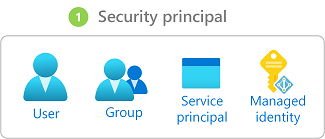
Diagrams courtesy of Microsoft Learn / Azure docs: role-based-access-control/overview
Related
entraid · role-definition · role-assignment · scope · subscription · resource-group · azure-policy · northwind-traders-case-study
📘 Source: Microsoft Learn — Azure RBAC, checked 2026-09-16. Re-audit when role-assignment evaluation or built-in role behavior changes.
Azure Policy
What it is
Azure Policy is Azure’s rules engine for resource configuration. It compares resources and management actions with rules your organization assigns, such as “deploy only in approved regions” or “add a cost-center tag.” It can report a mismatch, block a non-compliant change, alter a resource, or deploy related configuration, depending on the policy effect.
Why it exists
People make mistakes. Policy lets an org codify governance so non-compliant resources are automatically flagged (and optionally prevented/denied) at scale across subscriptions — regardless of who creates them.
The pieces
- A definition states one rule. Azure supplies built-ins and organizations can create custom definitions.
- An initiative groups several definitions for one goal, such as a security baseline.
- An assignment applies a definition or initiative at a scope. Child scopes inherit it unless excluded.
- The effect says how Azure responds.
Auditreports non-compliance;Denyprevents the non-compliant create or update;ModifyorDeployIfNotExistscan change or add supported configuration and can require remediation for existing resources.
Northwind example
Maya assigns an “allowed locations” policy to Northwind’s Production management group. When Luis tries to create a production VM in an unapproved region, a Deny effect blocks the request even if his RBAC role lets him create VMs. A different tagging policy first uses Audit, so Northwind can see which resources lack a costCenter tag before deciding whether to use Modify or Deny.
This example shows the division of labor: RBAC asks whether Luis may create a VM; Policy asks whether the requested VM configuration follows Northwind’s rule.
Use it safely
Start an unfamiliar policy in audit mode when practical. Review existing resources, automation, exclusions, and remediation permissions before enforcing with Deny, Modify, or DeployIfNotExists. A policy assignment is powerful at a management-group scope: one mistaken rule can affect many subscriptions.
Common confusion
- Policy does not replace RBAC. It normally does not grant a user permission to act.
- A policy definition alone does nothing until it is assigned to a scope.
- A compliance report does not automatically fix existing resources. Remediation is effect- and resource-specific.
- A more-permissive child assignment does not override an inherited deny. Change or exclude the broader assignment instead.
How it fits (diagram)

Diagrams courtesy of Microsoft Learn / Azure docs: azure-policy/overview
Where it appears in the route
Read azure-management-hierarchy and scope before using this entry in AZ-104 foundation.
Related
management-groups · scope · rbac · resource-tags · northwind-traders-case-study
📘 Source: Microsoft Learn — Azure Policy overview, checked 2026-09-16.