AZ-900 — Azure Fundamentals

Why this path exists

This is the first technical path. It gives a learner who has never used Azure a model for cloud responsibility, Azure’s resource hierarchy, common services, identity, governance, cost, and observability. It prepares the learner for administration without assuming that product names explain themselves.

Central mental model

An Azure workload is something a person or team owns. A tenant supplies identity; a subscription supplies billing and a resource boundary; resource groups organize deployed resources; Azure Resource Manager applies control-plane changes; services run the workload; identity, networking, data, monitoring, recovery, and cost controls surround it.

Map / Canvas

AZ-900 foundations relationship map

Ordered modules

  1. Start from zero — operating-system, network, HTTP, JSON, shell, and permission vocabulary.
  2. Cloud foundations — shared responsibility, deployment models, service models, capacity, availability, and reliability.
  3. Azure architecture and resource hierarchy — geography, failure boundaries, management scopes, ARM, and control/data planes.
  4. Core Azure services — compute, networking, storage, endpoints, and migration decisions.
  5. Management, governance, and observability — tools, IaC, identity, Policy, locks, tags, cost, health, and telemetry.
  6. Identity, security, governance, and cost — authentication, authorization, security layers, compliance, and cost decisions.

Important relationships and comparisons

  • A tenant authenticates principals; a subscription scopes Azure resources and billing; Azure RBAC authorizes actions at a scope.
  • IaaS leaves more operating-system responsibility with the customer; PaaS moves runtime responsibility to Azure; SaaS supplies the application.
  • A region contains datacenters; an availability zone is a separated datacenter grouping within a region; a region pair supports regional design, not automatic application recovery.
  • Azure DNS resolves names; endpoints and network controls determine whether traffic can reach the destination.
  • Azure Policy evaluates desired governance rules; resource locks protect management operations; tags classify resources but do not enforce compliance.

Conceptual checkpoint

Given a small web workload, explain which responsibility remains with the customer, where its resources live, how a user authenticates, how Azure authorizes a change, how a name resolves, how the service is monitored, and which cost/governance control addresses each risk.

Next path

Continue to AZ-104 foundation and administration.

Sources and re-audit

Re-audit when the study-guide effective date, course syllabus, or Azure service behavior changes.

Cloud computing & service models (IaaS / PaaS / SaaS)

What it is

Cloud computing is renting computing capability—servers, storage, databases, networking, or complete software—when you need it instead of buying and running every physical machine yourself. You still make choices about data, identity, configuration, cost, and recovery.

The service model tells you how much of the technical stack Azure operates and how much your team operates.

You manageProvider managesExample
IaaS (infrastructure)Guest OS, patches, app, data, much of the configurationPhysical datacenter and underlying host infrastructure[[azure-vm
PaaS (platform)App code, data, access, settingsThe managed runtime and underlying infrastructure[[app-service
SaaS (software)Users, data, access, configuration choicesThe application and its platformMicrosoft 365, Azure DevOps

Why it exists

You can use on-demand capacity and managed services instead of operating all physical infrastructure yourself. Pricing depends on each service’s meter, tier, and any commitment; estimate and monitor cost before creating resources.

Key ideas

Choose IaaS when the application genuinely needs control of the operating system or a configuration the platform does not offer. Choose PaaS when the team wants to spend more time on its application and less on server maintenance. Choose SaaS when a ready-made application meets the business need. More managed does not mean “no work”; it moves operational work to Azure and leaves your organization responsible for safe use.

Northwind example

Northwind could run its ordering site on a VM (IaaS). Luis would choose and patch the guest operating system. If he instead uses App Service (PaaS), he deploys the application and configures its settings while Azure operates the underlying web platform. Priya uses a SaaS finance application: she manages who can use it and the business data, not its servers.

Shared-responsibility check

Before assuming Azure handles something, name the task: applying security updates to a VM guest OS is normally Northwind’s IaaS responsibility; controlling who can read order data remains Northwind’s responsibility in every model. The exact split varies by service, configuration, and agreement, so use the service documentation for a production design.

Common confusion

  • “Cloud” does not mean a resource has no physical location. Regional services are still deployed in Azure regions.
  • “Serverless” does not mean an application has no servers; it means the provider manages the server infrastructure exposed to you.
  • IaaS, PaaS, and SaaS are responsibility models, not a security ranking. Any model can be unsafe when identities, data, or configuration are mishandled.

azure-vm · app-service · azure-functions · azure-region · resource-group · arm · northwind-traders-case-study

📘 Source: Microsoft Learn — Shared responsibility in the cloud, checked 2026-09-16.

Resource group

What it is

A resource group is a logical container for Azure resources that share a lifecycle: you expect to deploy, update, and eventually retire them together. A resource group belongs to one subscription. Most application resources belong to one resource group, although Azure also supports specific resource types at subscription, management-group, or tenant scope.

Why it exists

Instead of managing every resource in isolation, you group the resources of an application/lifecycle into one container so you can deploy, update, delete, monitor, and secure them as a unit — and apply RBAC and Azure Policy at that scoped boundary.

Key ideas

  • One place, one owner — a resource can be in only one RG (but can later be moved between RGs/subscriptions).
  • RG location ≠ resource locations. The RG’s region is where the RG’s metadata is stored; the resources inside it can be in any region. This is a classic trap.
  • Lifecycle unit — deleting a RG deletes all resources inside it (a boundary of operation, not of geographic data residency).
  • Deployment scope — ARM deployments and templates/Bicep target a RG.
  • Group by lifecycle + environment, not by resource type (that’s a common anti-pattern — mixing all VMs in one RG complicates lifecycle).

Northwind example

Northwind puts the ordering web app, its storage account, and its monitoring resources in orders-production because the team deploys and retires that solution together. It puts a shared network or a database with a different owner and retirement schedule in another resource group, even if the application connects to it. Connections can cross resource-group boundaries.

Deleting orders-production would delete its resources. That makes the group a convenient lifecycle boundary, but a dangerous one to use as a casual folder. Before deleting it, Northwind must understand every contained resource and retain backups where recovery is required.

Common confusion

  • The resource group’s location stores resource-management metadata. It does not force every contained resource or its customer data into that region.
  • A resource group is not an availability zone, virtual network, or security boundary. RBAC and Policy can be scoped to it, but networking and resiliency need their own design.
  • Tags on a resource group do not automatically flow to its resources.

How it fits (diagram)
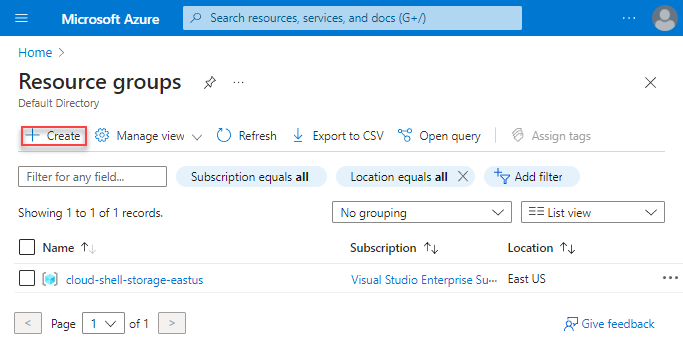
resource-group - Microsoft diagram

Diagrams courtesy of Microsoft Learn / Azure docs: azure-resource-manager/management/manage-resource-groups-portal

Exam notes

  • RG location is where metadata sits — the RG itself is not a physical place and stores no resources’ data.
  • Deleting a RG deletes everything inside it.
  • Move of a resource across RGs/subscriptions is possible but has constraints (recreate vs move, some resources can’t move).
  • Use RG to scope RBAC assignments and policies at an application boundary.

Path MOC · subscription · arm · scope · resource-tags · azure-policy

📘 Source: Microsoft Learn — Resource Group

Azure region

What it is

An Azure region is a geographic area containing one or more datacenters connected through Azure’s network. When you create a regional service, you choose a region such as eastus, westeurope, or uksouth. That choice affects the service’s location, what features are available, latency to users, pricing, and sometimes legal or organizational requirements.

Why it exists

You choose a region to place a workload near users or connected systems, to meet data-residency needs, and to use services available there. One subscription can contain workloads in many regions. Not every Azure service is regional; some are global, and service availability differs by region.

Region, zone, geography, and pair

  • A zone is a separate physical-fault boundary inside a zone-enabled region. A region is not itself a zone.
  • A geography is a market or area containing one or more regions and can matter for residency and compliance commitments.
  • Many regions have a region pair, but a pair is not an automatic disaster-recovery solution. Cross-region replication, failover, backups, and the application’s behavior must be configured service by service.
  • A sovereign cloud is a separately operated cloud environment for particular regulatory or government needs; it is not merely another public-cloud region.

How it fits (diagram)
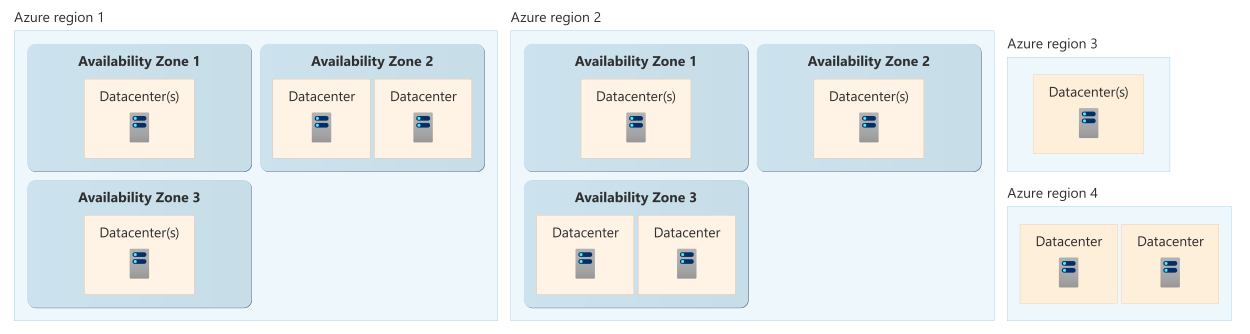
azure-region - Microsoft diagram

Diagrams courtesy of Microsoft Learn / Azure docs: reliability/availability-zones-overview

Northwind example

Northwind chooses a region near its customers and warehouse systems after checking that App Service, storage, and its required reliability options are supported there. Its production subscription may also contain monitoring or recovery resources elsewhere. If Northwind later needs to serve another continent or survive a full regional outage, it designs and tests a multi-region pattern; selecting a region pair alone does not copy its application.

Common confusion

  • A resource-group location is not the same as the location of every resource inside it.
  • A region can contain zones, but a region with zones does not automatically make every resource zone-resilient.
  • Changing a workload’s region is usually a service-specific move or redeployment, not a simple rename. Check the supported migration path before planning it.

availability-zones · subscription · resource-group · northwind-traders-case-study

📘 Sources: Microsoft Learn — Azure regions and geographies and What are availability zones?, checked 2026-09-16.

Azure Virtual Machine (VM)

What it is

An Azure virtual machine (VM) is a software-defined computer running on Azure infrastructure. It has an operating system, CPU and memory size, disks, and network interfaces. A VM is IaaS: Azure operates the physical hardware, but you operate the guest operating system and the software you install on it.

Why it exists

Some workloads need a real OS you can install anything on, tune, patch, and manage — existing on-premises apps, custom agents, licensed software. VMs give you that control without buying or racking hardware. You pay per second/hour for what you run.

Key ideas

  • Choose a VM size for CPU, memory, disk, and network needs. A larger size costs more; a small size can become a bottleneck.
  • A VM normally has an OS disk and can have data disks. Keep important application data off temporary local storage, which can be lost when the VM is deallocated or deleted.
  • A virtual NIC connects the VM to a VNet subnet. A public IP, NSG, routes, and load-balancing design determine how traffic reaches it; a VM is not automatically public.
  • You choose a secure administrator-access method and remain responsible for patching, configuration, applications, and data. Azure’s management of hardware does not patch the guest OS for you.
  • One VM is a single compute instance. Use availability-zones, availability sets, or a scale set when the workload needs replicas or a larger availability design.

Northwind example

Northwind initially runs a legacy warehouse connector on one Linux VM because the software requires OS-level configuration. Luis selects a size, managed data disk, private subnet, and SSH key authentication. The VM can connect to the ordering application, but it is not a resilient design by itself: a VM or its zone can fail. Northwind later runs two connector instances behind a health-aware traffic path if continuity is required.

Common confusion

  • Stopped and deallocated are different billing and capacity states. Check the current billing state before assuming compute charges have stopped; disks and other retained resources can still cost money.
  • A VM image is the starting software template. A snapshot is a point-in-time copy. Neither alone is a tested application recovery plan.
  • A VM is a compute resource, not a private network, firewall, backup, or load balancer.

How it fits (diagram)

Before creating one

Decide the resource group, region, size, operating-system image, disk type, network design, access method, monitoring, backup, and availability requirement. Use Bicep or ARM templates when a consistent, repeatable configuration is needed.

vm-sizes · managed-disks · vm-snapshot · availability-set · availability-zones · virtual-machine-scale-set · azure-vm-extension · azure-cli · bicep · northwind-traders-case-study

📘 Source: Microsoft Learn — Virtual machines in Azure, checked 2026-09-16.

Virtual Network (VNet)

What it is

An Azure Virtual Network (VNet) is a private network you define in Azure. It gives Azure resources a shared private address space and the network controls needed to communicate with each other, the internet, connected networks, and supported Azure services. Think of it as the boundary of Northwind’s private office network in Azure, not as a physical switch or a single datacenter.

Why it exists

Physical networks were constrained by hardware and on-premises cabling. A VNet gives you the same segmentation, routing, name resolution, and security primitives as an on-prem LAN, but delivered as an isolated slice of Azure’s shared cloud — provisioned in seconds and fully API-managed.

Key ideas

  • A VNet belongs to one Azure region and subscription. It spans the availability zones in that region; you do not create a separate VNet merely to use different zones.
  • You give the VNet a private address range, such as 10.0.0.0/16, expressed in CIDR notation, then divide it into subnets. Ranges must be planned so they do not overlap with networks you need to connect.
  • Azure supplies system routes. Route tables can direct traffic; network security groups decide whether matching traffic is allowed. A route is a path, not a firewall rule.
  • VNets can connect to other VNets through vnet-peering, and to on-premises networks through VPN Gateway or ExpressRoute.
  • Inbound internet access requires an intentional design such as a public IP or public load balancer. Plan outbound access explicitly as well; do not depend on an accidental default.

Northwind example

Northwind creates one production VNet and divides 10.20.0.0/16 into frontend, app, and private-endpoints subnets. Its public load balancer receives shopper traffic, while application-to-storage traffic uses a private endpoint. An NSG permits only the front-end traffic needed by the app tier. The VNet supplies the private network; the subnets organize it; the NSG filters it; and routes determine where it goes.

Common confusion

  • A VNet is not a VPN. A VPN gateway can connect a VNet to another network, but the VNet is the Azure network itself.
  • A VNet is not automatically isolated from all internet access. Inbound and outbound behavior must be designed and controlled.
  • A VNet does not replace an NSG, firewall, DNS, or load balancer. Those solve different network problems.

How it fits

Internet │  On-premises
   │      │      │
   ▼      ▼      ▼
[ public IP ][ VPN Gateway / ER ]
   ┌────────────── VNet (10.0.0.0/16) ──────────────┐
   │  Subnet A (10.0.1.0/24)    Subnet B (10.0.2.0/24) │
   │  [VM][LB]                   [VM][ASG]            │
   │  NSG / route tables / Azure Firewall             │
   └───────────────────────────────▲──────────────────┘
                                   │ vnet-peering
                          ┌────────┴────────┐
                          │  other VNet     │
                          └─────────────────┘

Practical limits and tradeoffs

  • Choose address ranges before deployment. Overlap can block peering, VPN, and hybrid connectivity later.
  • A VNet can contain resources with different roles, but use subnets and rules to limit unnecessary traffic between them.
  • Moving a VM to another VNet requires recreating the VM in the target VNet. Treat network moves as planned migrations, not a quick toggle.

subnet · cidr-ip-addressing · vnet-peering · route-table · nsg · private-endpoint · azure-dns · northwind-traders-case-study

📘 Source: Microsoft Learn — What is Azure Virtual Network?, checked 2026-09-16.

Storage account

What it is

A storage account is the Azure resource that provides a named home for Azure Storage data services. It can contain blob containers, file shares, queues, and tables, while applying key settings such as redundancy, network access, encryption, and performance to the account or its supported services. Think of it as a securely managed storage facility, not as one folder or one hard disk.

Why it exists

Instead of managing disks or servers for data, a storage account is wholly managed: you choose a name, kind, redundancy, and these apply consistently across every data service inside it. It is the unit you deploy, secure, and pay for.

Key ideas

  • The account name is globally unique in Azure Storage and appears in endpoints such as accountname.blob.core.windows.net. It is not an Azure user account.
  • Standard general-purpose v2 is the common general-purpose account. Other account types target specific performance or service needs; choose from current service documentation rather than assuming every feature works with every type.
  • The account is a shared boundary for important choices. For example, redundancy applies across storage services in an account, so resources with different recovery needs may need separate accounts.
  • A blob container is inside a storage account. A file share, queue, and table are different Azure Storage services, not other names for the same thing.
  • Access can use Microsoft Entra ID, shared keys, or narrowly scoped tokens depending on the service and scenario. Restrict network access separately through network rules or private connectivity.

Northwind example

Northwind creates northwindordersprod for order receipts. It stores uploaded receipt images in a blob container, chooses a redundancy option based on recovery needs, and limits access to the application identity and approved network path. It creates a separate account for disposable test data because test data has different cost, retention, and recovery needs.

Common confusion

  • A storage account is a control-plane resource; a blob, file share, queue, or table is the data stored through it.
  • An account’s redundancy copies data for infrastructure failures. It does not undo an application overwriting or deleting data.
  • “Private storage account” normally describes its network-access design, not a different storage-account product.

How it fits (diagram)

Design tradeoffs

  • Consolidating data in one account simplifies administration but couples its redundancy and networking choices.
  • Separating accounts can improve isolation and fit different requirements, but adds operational overhead.
  • Availability, supported regions, access tiers, and performance vary by account type and service. Verify the proposed combination before a production deployment.

redundancy-lrs-zrs-grs · access-tier · storage-performance · blob-storage · azure-files · storage-network-rule · storage-access-keys · sas-token · northwind-traders-case-study

📘 Source: Microsoft Learn — Storage account overview, checked 2026-09-16.

Microsoft Entra ID (formerly Azure Active Directory)

What it is

Microsoft Entra ID is Microsoft’s cloud-based identity and access-management service. It stores identities such as people, groups, devices, and applications; verifies a sign-in (authentication, “who are you?”); and can enforce sign-in policies. It was formerly called Azure Active Directory (Azure AD).

Why it exists

An organization needs one place to recognize its people and workloads across Azure, Microsoft 365, and connected apps—without running cloud domain controllers. An Entra tenant is that organization’s isolated directory.

Key ideas

  • Tenant: the isolated Entra directory for an organization. An Azure subscription trusts one tenant for identity.
  • Directory objects: users, groups, devices, applications, service principals, and managed identities.
  • Single sign-on (SSO): after a successful Entra sign-in, connected applications can reuse that identity experience instead of each asking for a separate password.
  • Policy is contextual: Conditional Access can require controls such as MFA based on the sign-in and policy conditions.
  • Not a domain controller: Entra ID can join and manage modern devices, but it is not Windows Server AD DS. A legacy workload needing LDAP, Kerberos/NTLM, or Group Policy needs AD DS-compatible services.

Components relevant to AZ-104

Relationship to RBAC

Azure RBAC authorizes access to Azure resources. Entra ID supplies the identity RBAC evaluates. Entra also has directory roles for managing Entra objects. In short: Entra helps establish who or what is asking; the assigned role and scope decide what that identity may do.

Northwind example

Maya creates an Entra group named Northwind-Platform-Admins, then assigns that group an Azure role at the appropriate scope. When Luis joins the platform team, Maya adds him to the group instead of making several separate role assignments. A Conditional Access policy asks Luis for MFA when its conditions require it. The group is not the resource permission by itself—it is a convenient way to give the same assignment to the right people.

Diagram
entraid - Microsoft diagram

Diagrams courtesy of Microsoft Learn / Azure docs: entra/identity/entra-overview

Exam notes

  • Entra ID = cloud identity, authentication, and policy layer. Azure RBAC = Azure-resource authorization layer.
  • Rebranded from Azure AD in 2023; the exam may still reference “Azure AD” — same thing.
  • A tenant = the container for identities; a subscription = a container for resources that trusts a tenant.

rbac · user-account · service-principal · mfa · conditional-access · tenant

📘 Sources: Microsoft Learn — What is Microsoft Entra? and Azure AD naming change.

Azure Policy

What it is

Azure Policy is Azure’s rules engine for resource configuration. It compares resources and management actions with rules your organization assigns, such as “deploy only in approved regions” or “add a cost-center tag.” It can report a mismatch, block a non-compliant change, alter a resource, or deploy related configuration, depending on the policy effect.

Why it exists

People make mistakes. Policy lets an org codify governance so non-compliant resources are automatically flagged (and optionally prevented/denied) at scale across subscriptions — regardless of who creates them.

The pieces

  • A definition states one rule. Azure supplies built-ins and organizations can create custom definitions.
  • An initiative groups several definitions for one goal, such as a security baseline.
  • An assignment applies a definition or initiative at a scope. Child scopes inherit it unless excluded.
  • The effect says how Azure responds. Audit reports non-compliance; Deny prevents the non-compliant create or update; Modify or DeployIfNotExists can change or add supported configuration and can require remediation for existing resources.

Northwind example

Maya assigns an “allowed locations” policy to Northwind’s Production management group. When Luis tries to create a production VM in an unapproved region, a Deny effect blocks the request even if his RBAC role lets him create VMs. A different tagging policy first uses Audit, so Northwind can see which resources lack a costCenter tag before deciding whether to use Modify or Deny.

This example shows the division of labor: RBAC asks whether Luis may create a VM; Policy asks whether the requested VM configuration follows Northwind’s rule.

Use it safely

Start an unfamiliar policy in audit mode when practical. Review existing resources, automation, exclusions, and remediation permissions before enforcing with Deny, Modify, or DeployIfNotExists. A policy assignment is powerful at a management-group scope: one mistaken rule can affect many subscriptions.

Common confusion

  • Policy does not replace RBAC. It normally does not grant a user permission to act.
  • A policy definition alone does nothing until it is assigned to a scope.
  • A compliance report does not automatically fix existing resources. Remediation is effect- and resource-specific.
  • A more-permissive child assignment does not override an inherited deny. Change or exclude the broader assignment instead.

How it fits (diagram)
azure-policy - Microsoft diagram

Diagrams courtesy of Microsoft Learn / Azure docs: azure-policy/overview

Where it appears in the route

Read azure-management-hierarchy and scope before using this entry in AZ-104 foundation.

management-groups · scope · rbac · resource-tags · northwind-traders-case-study

📘 Source: Microsoft Learn — Azure Policy overview, checked 2026-09-16.

starts withframesorganizesintroducesintroducesintroducesscopes accessworks withhostsconnects tostores data for